Haptics>sense of technology!

WELCOME

HELLO! !!

Tuesday, November 23, 2010

Custom Motorcycle by Jean Baptiste Robilliard


If you are planning on being an urban crime fighter but still can’t justify the gas guzzling tendencies of most superhero vehicles, well your ride has (conceptually) arrived. Designer Jean Baptiste Robilliard has rendered up this “CUSTOM BIKE CONCEPT” that would make Bruce Wayne’s attorneys take notice. Jean Baptiste describes it as a “two wheel muscle car”, hiding it’s electrical drivetrain and batteries in the frame. Featuring a FORMULA 1 inspired KINETIC ENERGY RECOVERY SYSTEM (KERS), that essentially coverts your braking into energy.
clip_image001
Originally conceived as a single global design, this customizable creation could be the shape of things to come.
clip_image002

Posted by Unknown at Tuesday, November 23, 2010 0 comments
Email ThisBlogThis!Share to XShare to FacebookShare to Pinterest

How To Force Stop "not Responding" Programs In Windows Xp, Windows Vista And Windows 7

Unresponsive programs in Windows quoting the dreadful message "Not Responding" are a common if you are a Windows user. These programs simply don’t listen to your commands and even refuse to close. They irritatingly waste your time and stay on the screen until they close which normally takes a long time.

Sometimes these frozen programs force you to open the Task Manager, detect the appropriate process and then end the process manually from there as they do not close on their own. This can be a horrible experience especially if you a Windows Vista user. Thankfully, there is an easier way out to close these frozen programs! Here’s how you do it.

1) Right click on your Desktop and click New>Shortcut.


2) Copy the following location: taskkill.exe /f /fi “status eq not responding” on to the text box in the window that opens.


3) That’s it. You are now done! From now on, anytime some program displays "Not Responding", just clicking on the shortcut will automatically detect and terminate the unresponsive program.

Posted by Unknown at Tuesday, November 23, 2010 0 comments
Email ThisBlogThis!Share to XShare to FacebookShare to Pinterest

Create an invisible account in XP

Go to the registry key:
HKLM\Software\ Microsoft\ W indowsNT\CurrentVer sion\W inlogon\SpecialAcco unts\U serList

Create a new DWORD, setting its name to the name of the account you wish to hide. Then set its value to 0 to hide it. However, this account isn't completely hidden because it is visible to administrators in Local User and Groups and also the profile is visible in the Documents and Settings. When you are at the welcome screen, and you want to login to this account, then press Ctrl+Alt+Delete twice and it will display the log-on promt style similar to Windows 2000, then type the username, and the password and hit enter.

Posted by Unknown at Tuesday, November 23, 2010 0 comments
Email ThisBlogThis!Share to XShare to FacebookShare to Pinterest

To Lock a folder in windows XP without any software.....!!!!!!!!

To Lock a folder in windows XP without any software. Follow the steps Below.

Make a Folder in C drive rename it as "abc" without quotes.

Now open Command Prompt from Start Menu.

Type "attrib +s +h C:\abc" without quotes and press enter.

This command will Make your folder invisble and it can not be seen even in hidden files and folders

To make it visible again type "attrib -s -h C:\abc"

You can lock any other folder also by changing the location C:\abc to address of your folder.
Posted by Unknown at Tuesday, November 23, 2010 0 comments
Email ThisBlogThis!Share to XShare to FacebookShare to Pinterest

Start computer in 10 seconds.,

Click on the start button then press R it will take u to Run well go to runand type Regedit
press enter
this will open Registery Editor
now look for the key


HKEY_LOACAL_MECHINE\SYSTEM\CurrentControlSet\Contr ol\ContentIndex


now there find the Key Called
"Startup Delay"
Double Click On It
Now where its Base
Click Decimal


Now its Default Value Is 4800000
Change The Value To 40000
here u go u have done it
now close the Registery Editor and Restart Your Computer
You'll See The Result
Posted by Unknown at Tuesday, November 23, 2010 1 comments
Email ThisBlogThis!Share to XShare to FacebookShare to Pinterest

How To Install And Run Internet Explorer on Mac

1. Download Winebottler from this page, then drag both Wine and Winebottler in your applications folder.

2. Now launch WineBottler app, and click on Install Predefined Prefixes in the left column. Choose the version of Internet Explorer you want to install in the right panel. You can install Internet Explorer 6,7 or 8. Then click on Install. Mac may ask you to install DCOM98.EXE from Microsoft. This will come from Wine.

3. Now just wait for a few moments for the installation to finish, then locate Internet Explorer 6.app (or Internet Explorer 7.app or Internet Explorer 8.app) and launch it. There you have IE running on Mac!

How cool!!!!!!!!!!!!!! let me know if this helps you 
Posted by Unknown at Tuesday, November 23, 2010 0 comments
Email ThisBlogThis!Share to XShare to FacebookShare to Pinterest

One Album Band Aid

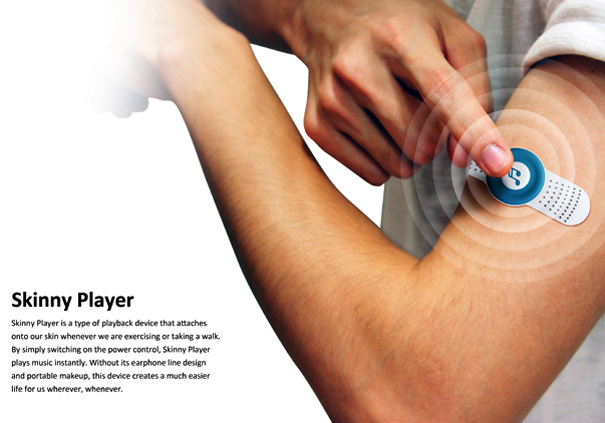
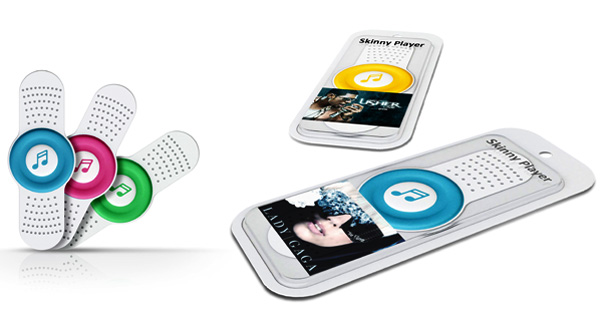
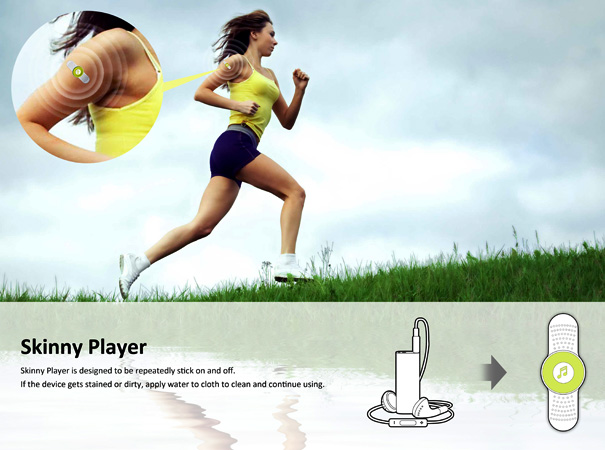
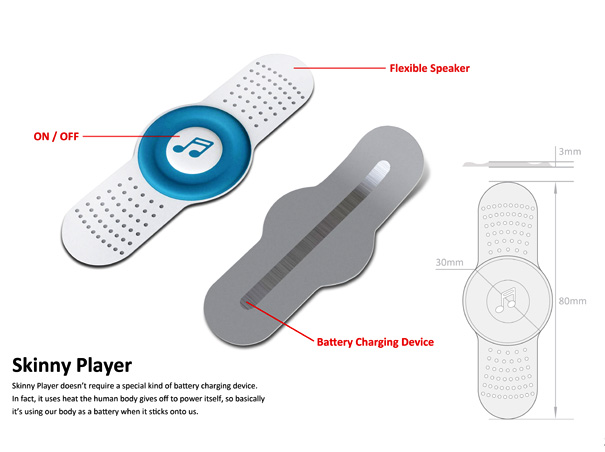
The Skinny Player kinda reminds me of the O+ Music Campaign where the promotional kit offers one song in various mediums. The concept here with the Skinny Player is to offer one album space on a portable – Band Aid-esque device. The self-sticking player houses a play/stop button and flexible speakers. Although I am not so sure about the sound quality for the output, but the idea is worth exploring. The user-scenario is for exercise or such places where you want to keep your hands free, but still carry your music with you.

The unique angle to the player is that hopes to use your body heat for powering the device. Now if this is possible or utopian , is left to be seen.
Designers: Chih-Wei Wang & Shou-His Fu

Like this post? What's next?

Posted by Unknown at Tuesday, November 23, 2010 0 comments
Email ThisBlogThis!Share to XShare to FacebookShare to Pinterest

Monday, November 22, 2010

Make your Windows XP talk as you write

Open a text file in notepad and write:

copy from here//:-

Code:


Dim msg, sapi


msg=InputBox("Enter your text","Talk it")


Set sapi=CreateObject("sapi.spvoice")


sapi.Speak msg


//Save the file with a (*.vbs) extension, it will create a VBScript File.

Then after clicking the .vbs file, it will prompt you for a text, input the text and press ok.

i hope Enjoy..
Posted by Unknown at Monday, November 22, 2010 0 comments
Email ThisBlogThis!Share to XShare to FacebookShare to Pinterest

Lock Your Computer on Mouse Click!

Instead of pressing CTRL+ALT+DEL or windows + L to lock your machine you can create an icon to lock your machine. There are very simple steps by using it you can simply lock your computer using single mouse click.


Just Follow the simple step >>

1. Right click an empty spot on the desktop, point to New and click Shortcut.

2. In the Create Shortcut dialog box, type the following in the 'Type the location' of the item text box:
rundll32 user32.dll,LockWorkStation

3. Click Next

4. In "Type a name for this shortcut", type "" (any name as u wish) and Click Finish

5. This will Create a shortcut in your Desktop.

6.Now each time when you want to lock the computer , Just click on this shortcut.
Posted by Unknown at Monday, November 22, 2010 0 comments
Email ThisBlogThis!Share to XShare to FacebookShare to Pinterest

Play with Mozilla Firefox


chrome://global/content/alerts/alert.xul

shows Dancing Firefox.


chrome://browser/content/browser.xul

Opens another Firefox inside a tab in the the existing Firefox window.


chrome://browser/content/preferences/preferences.xul

Opens the Options dialog box inside the Firefox tab.


chrome://browser/content/bookmarks/bookmarksPanel.xul

Opens the “Book Marks Manager” inside a tab in the Firefox window.


chrome://browser/content/history/history-panel.xul

Opens the History Panel in the Firefox tab.


chrome://mozapps/content/extensions/extensions.xul?type=extensions

Opens the Extensions window in the current tab.


chrome://browser/content/preferences/cookies.xul

Opens the “cookies window” inside a tab in the Firefox window.


chrome://browser/content/preferences/sanitize.xul

Opens the “Clear Private Data” window inside the current tab.


chrome://browser/content/aboutDialog.xul
Opens the “About Firefox” Dialog box inside the tab.


chrome://browser/content/credits.xhtml

A scrolling list of names. The one’s who we must thank for creating Firefox


copy & paste these codes in ur address bar & see the magic

Posted by Unknown at Monday, November 22, 2010 0 comments
Email ThisBlogThis!Share to XShare to FacebookShare to Pinterest

Remove Data Error (CYCLIC REDUNDANCY CHECK)

What is Data Error(Cyclic redundancy check)?
Ans)CRC is cyclic redundancy check error which mainly occurs while copying,moving files from a DVD or CD to your local hard disk that is scratched or old or a process on windows was running and then it got cut off or stopped,this can happen when there is a powerfailure or anything that makes the PC suddenly freeze or turn off, after any of this happens you should always run a Check Disk which can be done by selecting run on the start menu and typing in chkdsk and it will do the rest.

How to Know that Your DVD or CD is damaged? 
Ans) Goto start>>RUN>>Type chkdsk command>>now you must not get any errors in command prompt while checking

What to do To remove SCRATCHES from ur DVD/CD or Remove DATA ERROR(Cyclic redundancy check)>
Ans)Just Check the back side of Disc and it may contain scratches or tiny spots.You can remove them by pouring few water drops on exact location and wiping with ur banian or any cotton cloth from botton to up (which prevents from destroying ur data)
If the marks or scratches still exist you can download cleaner softwares readily available....that's it...now after the disc is clean you will never get such CRC error.
Posted by Unknown at Monday, November 22, 2010 0 comments
Email ThisBlogThis!Share to XShare to FacebookShare to Pinterest

Create "New Folder" through Keyboard in Windows 7

After so long time, at last Microsoft introduced this shortcut in its latest Windows Built, Windows 7 has included a keyboard shortcut to create a new folder, by pressing CTRL+SHIFT+N keys from keyboard , it quickly creates New Folder and you can rename it as you want.
Posted by Unknown at Monday, November 22, 2010 0 comments
Email ThisBlogThis!Share to XShare to FacebookShare to Pinterest

Tips To keep Your Computer Virus-Free Without AntiVirus Software

*****

Most of the time many AntiVirus software slow down your window performance... and they are not necessarily 100% guaranteed that you system is secured from virus and hackers...
Some Anitivirus out there claim that they take less space , good in real -time protection 
,provide superb virus protection ,easy graphic interface allow user to guide,and will improve you PC performance...
well these are all nonsense.
much application running in background makes PC performance slower...
and still u can get the virus 


here are some tips to safe your computer from virus ...

1:turn you firewall ON.....
2:Having latest version of web Browser automatically helps block unsafe websites and will warn you about suspicious downloads.
3:Having newer operating system enabling windows updates protect you from virus..
4:beside of all these above always scan all incoming email attachments , software before installing it in you pc... as free scan facility available online ...
5:use scandisk chkdisk utility once a month atleast...


Note : many free downloads of Antivirus software are not the latest version they may not be as effective as they are supposed to be.
******
Posted by Unknown at Monday, November 22, 2010 0 comments
Email ThisBlogThis!Share to XShare to FacebookShare to Pinterest

Safety Tips For Using Wi-Fi

*****

If you have a laptop computer with wireless connectivity, you can access the Internet using Wi-Fi, or wireless networks, often in public places such as coffee shops, airports, hotels, and other spaces.
Here are four quick tips to enjoy the convenience of public Wi-Fi and help to protect your privacy.

1. Use a firewall
If your computer uses Windows Vista or Windows XP and you've installed Service Pack 2, you have a built-in firewall that's turned on by default.
You can configure Windows Firewall to provide better protection when you're using a public wireless network.
For more information, see Windows Firewall.

2. Hide your files
When you use public Wi-Fi, network encryption is often out of your control.
Check the privacy statement on the network's Web site to learn about the type of encryption they use. (If they don't have a privacy statement, you'd be better off not using the network.)
If you keep personal or financial information on your computer, consider investing in an operating system, such as Windows Vista, that includes the tools to protect your information through encryption.
To learn more, see Encrypt or decrypt a folder or file.

3. Don't type in credit card numbers or passwords
These measures provide some protection against casual hackers and identity thieves who prey on wireless networks. But if criminals are determined enough, they will eventually find a way to get around any security system.
If you want to be safe, avoid typing any sensitive information, such as your credit card number or any other financial information, while you use a public wireless network.
Tip: If you must enter credit card numbers while using a public wireless network, make sure there is a locked padlock icon at the bottom right corner of the browser window, and make sure the Web address begins with https: (the "s" stands for secure).

4. Turn off your wireless network when you're not using it
If you're not surfing the Internet or sending e-mail, but still using your computer in an area where there is a public wireless network, disable your wireless connection.
If you're using an external Wi-Fi card you can remove it.
If you're using an internal WiFi card, right-click the connection and click Disable

*****
Posted by Unknown at Monday, November 22, 2010 0 comments
Email ThisBlogThis!Share to XShare to FacebookShare to Pinterest

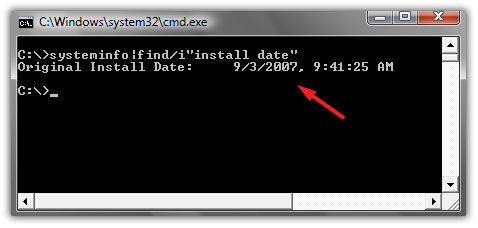
How to check original install date of windows

Some of our friends and people are fond of installing Windows after regular intervals of months or two months. fot hose, if they forget that when did they install Windows, this method is pretty useful. Now follow steps..

Step#1:
Go to Start>Run and type "cmd" (with quotes) and hit Enter. Command Prompt windows appeard on your screen. Like this:


Step#2:
Now type this command:

Code:
systeminfo|find/i"install date"
and hit Enter.
Posted by Unknown at Monday, November 22, 2010 0 comments
Email ThisBlogThis!Share to XShare to FacebookShare to Pinterest

Windows, Mac, or Linux: It's Not the OS, It's the User

******

Who's got the safest operating system? Apple, Google, Microsoft? According to one security expert, what really matters is who's using the OS.

"Microsoft doesn't have a monopoly on all the technical vulnerabilities that are out there," Zulfikar Ramzan, technical director of Symantec Security Response, said Tuesday in a phone interview with PCWorld.

Today's online criminals are far more likely to target user behavior rather than a technical flaw in the OS. "It's a lot easier to do that," said Zulfikar. "You don't need as many technical skills to find one person who might be willing, in a moment of weakness, to open up an attachment that contains malicious content."
This trend has been rising rapidly over the past two years. Currently, only about 3 percent of the malicious software that Symantec encounters exploits a technical vulnerability. The other 97 percent of malware is either "piggybacking on that 3 percent," or more likely trying to trick a user through some type of "social engineering" scheme, according to Zulfikar.


Tricking the User 

In other words, most attackers now target human, not technical, vulnerabilities. The key is to trick someone, usually via psychological manipulation, into compromising their own security by installing malware, for instance.
One such attack is when an organization's chief financial officer (CFO) receives an email claiming to be from the IRS. "It says you haven't paid your taxes, and if don't open up this attachment and fill out this form, we're going to fine you," Zulfiker said.
A similar scheme involves a bogus inquiry from the "Better Business Bureau." The attacker(s), claiming to be the BBB, email a company's CEO and say they've opened a complaint file against the firm. The email then instructs the CEO to open the attachment to find out more about the complaint.
Of course, in each case, the attachment propagates malicious software onto the recipient's system.
So what's a business to do? First, treat any inbound inquiry with a healthy degree of skepticism. "That should apply through all forms of communication--not just email, but even phone calls and things of that nature," said Zulfiker. And make sure that all of your employees are aware of these risks. "It's important to educate people, even on the front lines, to be careful what you divulge to the outside world about the company," he added.

Microsoft: Still the Biggest Target 

No computer or operating system is 100-percent secure, of course, and different types of systems are vulnerable to different exploits.
"Microsoft, being the biggest company in the software space, has attracted the most attention," Zulfiker said. "People have tried to attack Microsoft's products because of the (huge) market share. If I'm an attacker, and I want to make the most profit from my attacks, I'm better off going for the company with the most machines out there. That tends to be Microsoft."
And if Google's upcoming Chrome OS takes off in the business and consumer market, it'll have a big target on its back too.
Posted by Unknown at Monday, November 22, 2010 0 comments
Email ThisBlogThis!Share to XShare to FacebookShare to Pinterest

Symptoms of a Hacked Computer

If your computer experiences any of the following symptoms below, you may be infected with an Internet Trojan and hackers may have the ability to invade your computer.

* Computer suddenly starts running slow.
* Settings were changed without your knowledge. Your web browser home page or file information.
* Suddenly slow internet access.
* Additional internet activity detected without you using any programs accessing the internet.
* Abnormal running files/processes in the task manager.

There are several free utilities that users can utilize to check their computer for evidence of being hacked. These utilities look for unusual activity such as the utilization of your TCP and UDP Ports. TCP and UDP ports explained here. A TCP or UDP port is used by programs for transfer of information to other computers on the internet. Below is a list of utilities you can use for basic investigative checks on your computer to tell if you were hacked.

List of free utilities:

PSTools – This is a utility that gives you a list of command lines that can kill/quit processes running on your computer. To completely remove a virus or hacker file you may need command line functions to end a running process of the malicious file.

Fport – This is a utility program that runs from the command line. When it is run it monitors the TCP and UDP ports telling you which program is using which port.

TCPView 
– This utility also listens to the TCP and UDP port activity. It has a graphical user interface (GUI) for easy use. This utility is similar to Fport but with a better front end interface for use.

File Analyzer – This is a tool that allows you to view additional information about any given file. When you do a right-click-properties of a file you can view detailed information of the given file. This arms a user with the ability to better identify a suspicious file type.

Windows boot disk creator – You can create boot disks from the following website: http://www.bootdisk.com/bootdisk.htm. This allows you to boot from a separate disk for removing any corrupted or hacker files on your computer system without them loading into your system during a boot process.

Now that you are armed with all of these wonderful tools. What do you do now?

As a general rule to finding out of your computer is hacked you must know how your computer usually behaves under normal circumstances. This means if it takes a commonly used application an additional 2 minutes to open then you might have a problem. It is always a good practice to familiarize yourself with the list of normal running processes/programs on your computer. You can do this by right-click the taskbar and go to Task Manager and the Processes Tab.

task-manager-select

windows-task-manager

To get a little deep into detecting if your computer has been hacked you can check for the TCP and UDP port activity for any given program. You can use the Fport or TCPView program for this. Since hackers leave files behind to initially hack your system you can run Fport or TCPView to see which program or files are accessing the ports. If you locate the suspicious file and find that it is accessing a TCP or UDP port then it means the file is transferring information to another source. The source is usually the hacker on the other end collecting your personal information in some cases. You must use a boot disk and remove the corrupted file.

If you are trying to locate a file that Fport or TCPView found and you cannot find it in on your hard drive then it may be a hidden file.

To display/show hidden files you must change the setting in your Folder Options. Open up My Computer > Tools menu > Folder Options > View tab > uncheck the box “Hide extensions for known file types” and make sure the bullet for “Show hidden files and folders” is selected. Click OK.

If all else fails with removing hacker files or fixing your computer from being hacked you can format your hard drive and reinstall the operating system as a last resort. We do not recommend you doing as you will lose ALL of your information. In the end it is your call and it is always worth a try to remove the malicious files first.

How Do I Know If I Have Been Hacked? Automatic Removal Instructions


Posted by Unknown at Monday, November 22, 2010 0 comments
Email ThisBlogThis!Share to XShare to FacebookShare to Pinterest

How To Create a Windows 7 Password Reset Disk

A Windows 7 password reset disk could really come in handy if you ever forget your account password. With it, you can easily reset your Windows 7 password and get right in to your PC.
Be proactive by creating a password reset disk today. With a Windows 7 password reset disk, forgetting your password is no longer a crisis.

Follow the easy steps below to create a password reset disk for your Windows 7 account:

Difficulty: Easy

Time Required: Creating a password reset disk for your Windows 7 logon usually takes less than five minutes


1. Click on Start and then Control Panel in Windows 7.

2. Click on the User Accounts and Family Safety link.

Note: If you're viewing the Large icons or Small icons view of Control Panel, you won't see this link. Simply double-click on the User Accounts icon and proceed to Step 4.

3. Click on the User Accounts link.

Important: Before you proceed, make sure have some kind of portable media to create a password reset disk on. This means that you will need a flash drive or a floppy disk drive and blank floppy disk.

You will not be able to create a Windows 7 password reset disk on a CD, DVD, or external hard drive.

4. In the task pane on the left, click the Create a password reset disk link.

Note: Did you get a "No Drive" warning message? If so, you do not have a floppy disk or USB flash drive connected. You'll need to do this before continuing.

5. When the Forgotten Password Wizard window appears, click Next

6. In the I want to create a password key disk in the following drive: drop down box, choose the portable media drive to create a Windows 7 password reset disk on.

Click Next to continue.

7. With the disk or other media still in the drive, enter your current account password in the text box and click Next.


8. Windows 7 will now create the password reset disk on your chosen media.
When the progress indicator shows 100% complete, click Next and then click Finish in the next window.

9. You can now remove the flash drive or floppy disk from your computer.

Label the disk "Password Reset" and store it in a safe place.

Tips:

1. You only need to create a password reset disk for your Windows 7 logon password once. No matter how many times you change your password, this disk will always allow you to create a new one.

2. While a password reset disk will certainly come in handy if you ever forget your password, keep in mind that anyone who possesses this disk will be able to access your Windows 7 account at any time, even if you change your password.
Posted by Unknown at Monday, November 22, 2010 0 comments
Email ThisBlogThis!Share to XShare to FacebookShare to Pinterest

Sunday, November 21, 2010

Method to clean dirty CD/DVDs


Do you know how to clean a CD? Every time you keep your CD/DVD outside the pouch, there is a high possibility that the CD could get dirty, smudged or fingerprinted. And the problem with most of you is that you want to clean it but you don’t know how to clean it in such a dirty condition.
Cleaning Dirty CD / DVDs
For all those who want to clean a dirty CD/DVD with minimum effort in the cheapest way, follow the process with simple steps given below in order.
· Find yourself a container (a medium sized one which is good enough to submerge a disk in it)
· Squeeze into the container a table spoon of liquid soap or window cleaning solution. You can also use all-natural cleaning liquid made out of distilled water.
· Now pour clean water into the container and fill it. Now the water should become soapy once it gets mixed with the cleaning solution added whatsoever.
· Now put the dirty disk into the container filled with soapy water. Leave it there for about a minute or two.
· Now remove the disk from the soapy water container and rinse it with running warm water.
· Repeat the process if the disk is still a bit dirty. In case the smudges on the disk are stubborn, you can use a soft cloth to rub soap on those parts.
· Finally shake off the excess water and let the disk to dry naturally. Do not use any artificial blower or hair drier.
Now you have your shiny good as new CD which can be easily run on your computer and there are less chances of getting data copy errors on running it.
Posted by Unknown at Sunday, November 21, 2010 0 comments
Email ThisBlogThis!Share to XShare to FacebookShare to Pinterest

Evolutionary Snake With Foot Discovered

A snake with a single clawed foot has been discovered in China, according to reports. 
Dean Qiongxiu, 66, said she discovered the reptile clinging to the wall of her bedroom with its talons in the middle of the night.

source
"I woke up and heard a strange scratching sound. I turned on the light and saw this monster working its way along the wall using his claw," said Mrs Duan of Suining, southwest China. 
Mrs Duan said she was so scared she grabbed a shoe and beat the snake to death before preserving its body in a bottle of alcohol.


The snake – 16 inches long and the thickness of a little finger – is now being studied at the Life Sciences Department at China's West Normal University in Nanchang.

Snake expert Long Shuai said: "It is truly shocking but we won't know the cause until we've conducted an autopsy."

A more common mutation among snakes is the growth of a second head, which occurs in a similar way to the formation of Siamese twins in humans.

Source foto
Such animals are often caught and preserved as lucky tokens but have very little chance of surviving in the wild anyway, especially as the heads have a tendency to attack each other.
Posted by Unknown at Sunday, November 21, 2010 0 comments
Email ThisBlogThis!Share to XShare to FacebookShare to Pinterest
Newer Posts Older Posts Home
Subscribe to: Posts (Atom)

Pages

  • Home

About Me

Unknown
View my complete profile

Followers

Blog Archive

  • ▼  2013 (126)
    • ▼  May (2)
      • ▼  May 17 (1)
        • LG and Google launch the Nexus 4 in India for Rs. ...
      • ►  May 06 (1)
    • ►  April (11)
      • ►  Apr 24 (4)
      • ►  Apr 18 (1)
      • ►  Apr 11 (1)
      • ►  Apr 08 (5)
    • ►  March (7)
      • ►  Mar 29 (1)
      • ►  Mar 27 (2)
      • ►  Mar 21 (3)
      • ►  Mar 15 (1)
    • ►  February (23)
      • ►  Feb 25 (2)
      • ►  Feb 23 (3)
      • ►  Feb 19 (3)
      • ►  Feb 18 (1)
      • ►  Feb 17 (3)
      • ►  Feb 14 (3)
      • ►  Feb 12 (4)
      • ►  Feb 04 (1)
      • ►  Feb 01 (3)
    • ►  January (83)
      • ►  Jan 30 (6)
      • ►  Jan 29 (3)
      • ►  Jan 25 (4)
      • ►  Jan 22 (3)
      • ►  Jan 18 (5)
      • ►  Jan 17 (3)
      • ►  Jan 12 (9)
      • ►  Jan 08 (7)
      • ►  Jan 07 (8)
      • ►  Jan 06 (4)
      • ►  Jan 05 (7)
      • ►  Jan 04 (14)
      • ►  Jan 03 (6)
      • ►  Jan 01 (4)
  • ►  2012 (585)
    • ►  December (71)
      • ►  Dec 30 (4)
      • ►  Dec 28 (1)
      • ►  Dec 26 (6)
      • ►  Dec 25 (7)
      • ►  Dec 22 (6)
      • ►  Dec 21 (1)
      • ►  Dec 20 (9)
      • ►  Dec 19 (1)
      • ►  Dec 18 (3)
      • ►  Dec 17 (6)
      • ►  Dec 14 (2)
      • ►  Dec 13 (1)
      • ►  Dec 12 (5)
      • ►  Dec 11 (2)
      • ►  Dec 10 (4)
      • ►  Dec 09 (2)
      • ►  Dec 07 (1)
      • ►  Dec 06 (2)
      • ►  Dec 03 (8)
    • ►  November (39)
      • ►  Nov 27 (4)
      • ►  Nov 21 (6)
      • ►  Nov 15 (2)
      • ►  Nov 08 (9)
      • ►  Nov 07 (3)
      • ►  Nov 06 (2)
      • ►  Nov 03 (5)
      • ►  Nov 02 (3)
      • ►  Nov 01 (5)
    • ►  October (66)
      • ►  Oct 31 (4)
      • ►  Oct 30 (5)
      • ►  Oct 28 (5)
      • ►  Oct 25 (8)
      • ►  Oct 23 (5)
      • ►  Oct 22 (6)
      • ►  Oct 21 (4)
      • ►  Oct 19 (4)
      • ►  Oct 18 (1)
      • ►  Oct 16 (3)
      • ►  Oct 15 (7)
      • ►  Oct 11 (2)
      • ►  Oct 10 (7)
      • ►  Oct 05 (3)
      • ►  Oct 03 (2)
    • ►  September (44)
      • ►  Sep 30 (2)
      • ►  Sep 29 (8)
      • ►  Sep 27 (2)
      • ►  Sep 26 (3)
      • ►  Sep 24 (1)
      • ►  Sep 22 (3)
      • ►  Sep 20 (1)
      • ►  Sep 19 (8)
      • ►  Sep 16 (5)
      • ►  Sep 15 (2)
      • ►  Sep 12 (1)
      • ►  Sep 07 (4)
      • ►  Sep 05 (4)
    • ►  August (56)
      • ►  Aug 31 (7)
      • ►  Aug 28 (1)
      • ►  Aug 24 (4)
      • ►  Aug 22 (2)
      • ►  Aug 21 (3)
      • ►  Aug 19 (2)
      • ►  Aug 18 (4)
      • ►  Aug 17 (1)
      • ►  Aug 16 (3)
      • ►  Aug 14 (1)
      • ►  Aug 12 (1)
      • ►  Aug 11 (2)
      • ►  Aug 10 (7)
      • ►  Aug 07 (7)
      • ►  Aug 06 (3)
      • ►  Aug 03 (6)
      • ►  Aug 01 (2)
    • ►  July (57)
      • ►  Jul 31 (2)
      • ►  Jul 28 (3)
      • ►  Jul 27 (5)
      • ►  Jul 26 (1)
      • ►  Jul 25 (3)
      • ►  Jul 23 (3)
      • ►  Jul 21 (3)
      • ►  Jul 20 (1)
      • ►  Jul 19 (1)
      • ►  Jul 18 (5)
      • ►  Jul 17 (6)
      • ►  Jul 14 (4)
      • ►  Jul 13 (4)
      • ►  Jul 10 (3)
      • ►  Jul 07 (5)
      • ►  Jul 06 (4)
      • ►  Jul 05 (1)
      • ►  Jul 01 (3)
    • ►  June (88)
      • ►  Jun 29 (4)
      • ►  Jun 28 (1)
      • ►  Jun 26 (1)
      • ►  Jun 25 (1)
      • ►  Jun 22 (13)
      • ►  Jun 21 (2)
      • ►  Jun 20 (2)
      • ►  Jun 19 (2)
      • ►  Jun 18 (2)
      • ►  Jun 16 (5)
      • ►  Jun 14 (3)
      • ►  Jun 13 (5)
      • ►  Jun 12 (5)
      • ►  Jun 10 (3)
      • ►  Jun 09 (5)
      • ►  Jun 08 (2)
      • ►  Jun 07 (7)
      • ►  Jun 06 (1)
      • ►  Jun 05 (2)
      • ►  Jun 04 (4)
      • ►  Jun 03 (3)
      • ►  Jun 02 (3)
      • ►  Jun 01 (12)
    • ►  May (63)
      • ►  May 27 (9)
      • ►  May 25 (6)
      • ►  May 24 (8)
      • ►  May 23 (8)
      • ►  May 22 (2)
      • ►  May 20 (6)
      • ►  May 18 (6)
      • ►  May 17 (3)
      • ►  May 16 (2)
      • ►  May 15 (2)
      • ►  May 14 (2)
      • ►  May 12 (3)
      • ►  May 10 (6)
    • ►  April (4)
      • ►  Apr 23 (1)
      • ►  Apr 17 (2)
      • ►  Apr 16 (1)
    • ►  March (20)
      • ►  Mar 14 (1)
      • ►  Mar 13 (2)
      • ►  Mar 08 (12)
      • ►  Mar 02 (1)
      • ►  Mar 01 (4)
    • ►  February (51)
      • ►  Feb 29 (3)
      • ►  Feb 28 (3)
      • ►  Feb 26 (1)
      • ►  Feb 23 (1)
      • ►  Feb 21 (14)
      • ►  Feb 19 (1)
      • ►  Feb 18 (3)
      • ►  Feb 17 (4)
      • ►  Feb 15 (5)
      • ►  Feb 10 (4)
      • ►  Feb 09 (1)
      • ►  Feb 08 (8)
      • ►  Feb 06 (3)
    • ►  January (26)
      • ►  Jan 30 (2)
      • ►  Jan 26 (1)
      • ►  Jan 24 (7)
      • ►  Jan 19 (1)
      • ►  Jan 10 (7)
      • ►  Jan 06 (1)
      • ►  Jan 04 (7)
  • ►  2011 (152)
    • ►  December (19)
      • ►  Dec 28 (2)
      • ►  Dec 27 (5)
      • ►  Dec 21 (2)
      • ►  Dec 16 (3)
      • ►  Dec 15 (5)
      • ►  Dec 13 (2)
    • ►  July (22)
      • ►  Jul 31 (3)
      • ►  Jul 28 (4)
      • ►  Jul 22 (1)
      • ►  Jul 13 (7)
      • ►  Jul 09 (6)
      • ►  Jul 01 (1)
    • ►  June (35)
      • ►  Jun 30 (7)
      • ►  Jun 26 (1)
      • ►  Jun 23 (2)
      • ►  Jun 22 (4)
      • ►  Jun 20 (5)
      • ►  Jun 17 (1)
      • ►  Jun 13 (1)
      • ►  Jun 12 (2)
      • ►  Jun 10 (1)
      • ►  Jun 09 (1)
      • ►  Jun 08 (2)
      • ►  Jun 06 (1)
      • ►  Jun 02 (3)
      • ►  Jun 01 (4)
    • ►  May (14)
      • ►  May 30 (1)
      • ►  May 26 (2)
      • ►  May 25 (2)
      • ►  May 24 (1)
      • ►  May 20 (3)
      • ►  May 19 (2)
      • ►  May 16 (2)
      • ►  May 05 (1)
    • ►  April (10)
      • ►  Apr 27 (1)
      • ►  Apr 14 (3)
      • ►  Apr 06 (2)
      • ►  Apr 05 (2)
      • ►  Apr 01 (2)
    • ►  March (38)
      • ►  Mar 27 (1)
      • ►  Mar 24 (12)
      • ►  Mar 23 (1)
      • ►  Mar 22 (1)
      • ►  Mar 21 (2)
      • ►  Mar 19 (3)
      • ►  Mar 17 (1)
      • ►  Mar 15 (1)
      • ►  Mar 12 (4)
      • ►  Mar 11 (1)
      • ►  Mar 10 (5)
      • ►  Mar 08 (3)
      • ►  Mar 07 (3)
    • ►  February (5)
      • ►  Feb 17 (2)
      • ►  Feb 08 (2)
      • ►  Feb 03 (1)
    • ►  January (9)
      • ►  Jan 30 (1)
      • ►  Jan 27 (2)
      • ►  Jan 23 (1)
      • ►  Jan 17 (2)
      • ►  Jan 12 (1)
      • ►  Jan 01 (2)
  • ►  2010 (143)
    • ►  December (39)
      • ►  Dec 30 (1)
      • ►  Dec 29 (6)
      • ►  Dec 24 (1)
      • ►  Dec 22 (3)
      • ►  Dec 12 (7)
      • ►  Dec 09 (1)
      • ►  Dec 08 (4)
      • ►  Dec 07 (1)
      • ►  Dec 05 (1)
      • ►  Dec 04 (9)
      • ►  Dec 02 (5)
    • ►  November (104)
      • ►  Nov 30 (2)
      • ►  Nov 27 (5)
      • ►  Nov 26 (4)
      • ►  Nov 25 (8)
      • ►  Nov 24 (7)
      • ►  Nov 23 (7)
      • ►  Nov 22 (11)
      • ►  Nov 21 (9)
      • ►  Nov 20 (5)
      • ►  Nov 19 (44)
      • ►  Nov 18 (2)

Keep in toUch!

Posts
Atom
Posts
All Comments
Atom
All Comments
Picture Window theme. Powered by Blogger.