WELCOME

HELLO! !!

Thursday, December 15, 2011

Sony Ericsson Nozomi images gets leaked


Now Sony Ericsson may not be the foremost makers of Android phones, nonetheless they release exceptionally trendy devices. The blogosphere have been talking about Nozomi from a couple of days previously, and now some guys got their hands on the snaps of the manufacturer’s forthcoming Sony Ericsson flagship device and its specs too. This device is code named Sony Ericsson LT26i. 
The gadget blueprint has an uncomplicated shape which gives it a smart glance that also hints us of Motorola implements, actually it pretty much looks like the Droic X. Nozomi is also supposed not to encompass a microSD card opening, so stretching the memory will not be an option. Now there is still no word about the release date, however, one can anticipate seeing this in January, at the CES or Mobile World Congress in Feb. But coming back to no SD cards is Sony Ericsson planning to go the Apple way? Will they be excluding the feature of SD card slots on all their devices next year? I don’t think this is the right move though. Also it is finally good to see a 1.5 GHz dual core processor with the Adreno 220 GPU, which makes it a powerful device though I am unhappy about the LCD display. I wonder why Sony Ericsson always choses LCD displays but as the resolution is 1280 x 720 pixels, it couldn’t be that bad.

The gadget allegedly carries some upright specs :-

Android 2.3.5 Gingerbread
4.3-inch LCD display of HD resolution (1280 x 720 pixels)
12 megapixel camera with FullHD video recording
1.5GHz dual core Scorpion processor with Adreno 220 GPU
1GB of RAM
16GB or 32GB of onboard storage
HDMI port for 1080p sharing on your HDTV

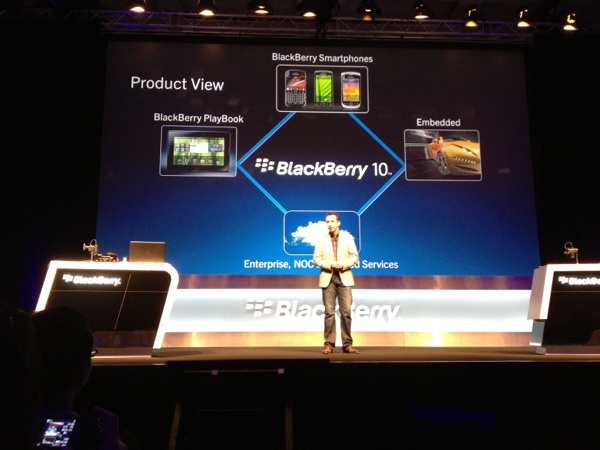
BlackBerry 10 announced at DevCon Asia in Singapore


Today at BlackBerry DevCon Asia in Singapore , RIM announced it’s next major platform version-BlackBerry 10 . RIM is calling it the single , converged , next-generation BlackBerry platform. We guess its just BBX in it’s consumer / marketing form. BlackBerry 10 will be the next major BlackBerry OS update after BlackBerry 7. RIM had literally flooded the market with an army of BlackBerry 7 devices and next year we can expect BlackBerry 10 devices. More on this soon. The real reason behind the change from BBX to BlackBerry is due to a ruling by a US  District Judge which prevents RIM from using the BBX brand at the conference.
BlackBerry 10 is essentially BBX. BBX certainly sounded better than BlackBerry 10 but RIM is facing legal issues for the same and might be forced to adopt the BlackBerry 10 branding.

Nokia Lumia 800 Gorilla Glass Test: Oh no, he did it again!


Remember when my good friend Stefanos Kofopoulos tortured the screen of the Nokia N8 in his famous video about a year ago? Well, Stefanos is at it again and sent over this video, where he puts the Gorilla Glass of Nokia’s first Windows Phone, the Lumia 800 through it’s paces. This video, posted over at hispestaola.gr blog is not for the faint hearted though, Stefanos does not hold back, scratching all over the display with keys, coins and even a Swiss Army knife! I don’t know about you, but those scratching sounds just made me cringe. Horrible stuff. What happens to the display you ask? Check out the video after the break and make sure to watch in full HD for full proof and enjoy!
Source: pestaola.gr

Tuesday, December 13, 2011

Android Tips and Tricks


*#*#4636#*#*


This shows the following information about your phone and battery:


    Phone information
    Battery information
    Battery history
    Usage statistics
========================================================================
    *#*#7780#*#*


This performs a factory data reset, and will remove the following:


    Google account settings stored in your phone
    System and application data and settings
    Downloaded applications


It will NOT remove:
Current system software and bundled applications
    SD card files e.g. photos, music files, etc.


PS: This one asks for a confirmation, so if you do get a chance to change your mind.
========================================================================
    *2767*3855#


Don’t try this one unless you’re sure. This code is used for factory format, and will remove all files and settings including the internal memory storage. It will also reinstall the firmware.


PS: Once you give this code, there is no way to cancel the operation unless you remove the battery from the phone, and even then, you run the risk of bricking your phone.
========================================================================
    *#*#34971539#*#*


This code is used to get information about the camera. It shows following 4 menus:


    Update camera firmware in image (Don’t try this option)
    Update camera firmware in SD card
    Get camera firmware version
    Get firmware update count


WARNING: Never use the first option otherwise your phone camera may stop working, and there is really no reason to update the camera firmware anyway.
==================================================================================================
    *#*#7594#*#*


This code will change the “End Call / Power” button action on your phone. By default, if you long press the button, it shows a screen asking you to select any option from Silent mode, Airplane mode and Power off.


You can change this action using this code. You can enable direct power off on this button so you don’t need to waste your time in selecting the option.
==================================================================================================
    *#*#273283*255*663282*#*#*


This code opens a File copy screen where you can backup your media files e.g. Images, Sound, Video and Voice memo.
==================================================================================================
    *#*#197328640#*#*


This code can be used to enter into Service mode. You can run various tests and change settings in the service mode.
==================================================================================================
   {{{ WLAN, GPS and Bluetooth Test Codes:}}}


*#*#232339#*#* OR *#*#526#*#* OR *#*#528#*#* – WLAN test (Use “Menu” button to start various tests)


*#*#232338#*#* – Shows WiFi MAC address


*#*#1472365#*#* – GPS test


*#*#1575#*#* – Another GPS test


*#*#232331#*#* – Bluetooth test
*#*#232337#*# – Shows Bluetooth device address
==================================================================================================
    *#*#8255#*#*


This code can be used to launch GTalk Service Monitor.
========================================================================
    {{{Codes to get Firmware version information:}}}


*#*#4986*2650468#*#* – PDA, Phone, H/W, RFCallDate


*#*#1234#*#* – PDA and Phone


*#*#1111#*#* – FTA SW Version


*#*#2222#*#* – FTA HW Version


*#*#44336#*#* - PDA, Phone, CSC, Build Time, Changelist number
========================================================================
    {{{Codes to launch various Factory Tests:}}}
*#*#0283#*#* – Packet Loopback


*#*#0*#*#* – LCD test


*#*#0673#*#* OR *#*#0289#*#* – Melody test


*#*#0842#*#* – Device test (Vibration test and BackLight test)


*#*#2663#*#* – Touch screen version


*#*#2664#*#* – Touch screen test


*#*#0588#*#* – Proximity sensor test


*#*#3264#*#* – RAM version
========================================================================

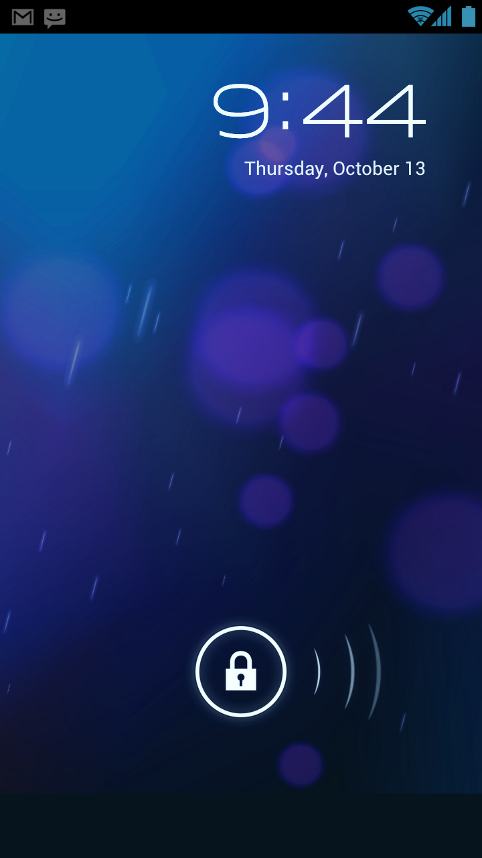
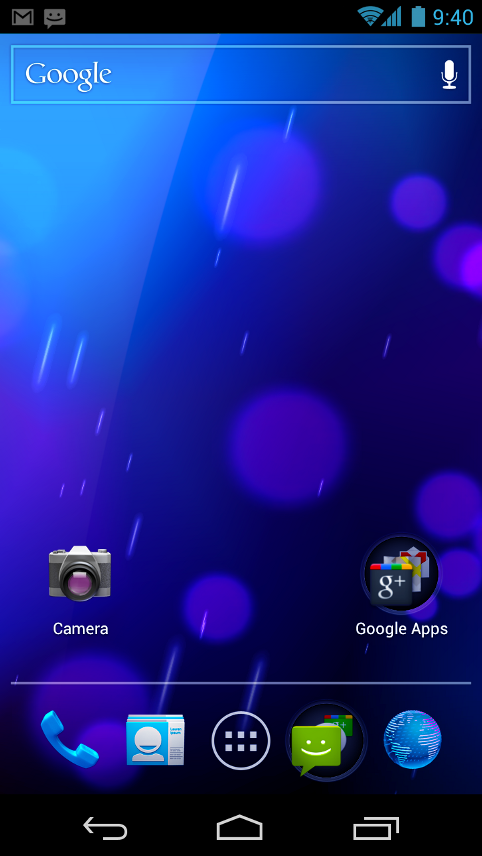
Android 4.0 (Ice Cream Sandwich)


Simple, beautiful, beyond smart

Android 4.0 builds on the things people love most about Android — easy multitasking, rich notifications, customizable home screens, resizable widgets, and deep interactivity — and adds powerful new ways of communicating and sharing.

Refined, evolved UI

Focused on bringing the power of Android to the surface, Android 4.0 makes common actions more visible and lets users navigate with simple, intuitive gestures. Refined animations and feedback throughout the system make interactions engaging and interesting. An entirely new typeface optimized for high-resolution screens improves readability and brings a polished, modern feel to the user interface.

Virtual buttons in the System Bar let users navigate instantly to Back, Home, and Recent Apps. The System Bar and virtual buttons are present across all apps, but can be dimmed by applications for full-screen viewing. Users can access each application's contextual options in the Action Bar, displayed at the top (and sometimes also at the bottom) of the screen.


Sunday, July 31, 2011

Apple is richer than the US Government


According to a recent report by the Financial Post, Apple has more cash than the U.S government. Applereported the quarterly earnings of US$ 75.876 billion till the 25th of June 2011 . The U.S governmentreported total operating balance of US$ 73.768 billion on Thursday , which is lesser than Apple.
Apple has seen tremendous growth since they introduced their first iPhone in the year of 2007. According to the recent report from IDC, Apple still holds the 4th place, based on the worldwide mobile phoneshipments in Q2 2011 and the shipments have increased 141.8% when compared to Q2 2010.
These figures are not directly comparable, since the U.S government’s balance amount is the amount of money they can spend before they hit the debts and the Apple’s earnings are the revenues from the sales. Based on the market capitalization, Apple is the second largest company in the world after Exxon Mobil.

iOS 5 Adding Face Recognition Support


9to5 Mac reports that Apple is adding support for face recognition in iOS 5.0 .  The feature will be accessible via API calls by developers allowing for some very interesting applications. The site reports that one of the APIs allows for recognizing the position of the person’s eyes and mouth.
Apple are also said to be working on some applications making use of the new features which will ship pre-installed on devices. Apple had previously acquired a company called Polar Rose in 2010 which specialized in Facial Recognition. Developers on Android have already demonstrated some interesting things which can be done by recognizing facial gestures and it will be very interesting to see how Apple takes this forward.

Nokia N9 Launching on 15th September on Swiss Orange ?


MeeGo Experts report that the long awaited Nokia N9 might be available via Swiss Orange starting September 15th. The website has put up a page for the MeeGo Harmattan device and listed 15th September as date of availability alongside the specifications.
The Nokia N9 comes with a large 3.9″ AMOLED curved glass display. The phone runs a custom build of MeeGo which uses a proprietary 3 panel Swipe-UI. The camera is an 8MP unit and captures 720p video at 30FPS.

Thursday, July 28, 2011

Samsung Releasing White Galaxy S II in August


It seems that Samsung is set to release the Galaxy S II in white. It will be the just like the international Samsung Galaxy S II GT-I9100 but in white colour.
The device is said to be coming out early next month (August). Handtec UK is already taking pre-orders for the white version. Were not sure if the entire device will be in white or whether the front or back alone will be in white.
Samsung are also said to be readying another version of the Galaxy S II with slightly better specifications including a faster processor. Perhaps this upgraded model might be released in white as well.
For people who already have the black version of the Galaxy S II and would like it in white, you can try the Glas protector from SGP. It gives you an option of White, Pink or Back front plate which doubles as a screen protector.

Mozilla B2G Announced : Web Centric Mobile OS


Mozilla today announced its plans to develop an open source mobile operating system. The OS will be focused primarily on web-apps. Dubbed B2G , the OS will make use of HTML5 capabilities to deliver basic phone functionality via various APIs.
Mozilla will be using parts from Android to enable hardware acceleration.
Mozilla’s plan with the OS is to provide :
  • New web APIs: build prototype APIs for exposing device and OS capabilities to content (Telephony, SMS, Camera, USB, Bluetooth, NFC, etc.)
  • Privilege model: making sure that these new capabilities are safely exposed to pages and applications
  • Booting: prototype a low-level substrate for an Android-compatible device
  • Applications: choose and port or build apps to prove out and prioritize the power of the system.
  • The User Interface is going to be entirely unique and will build an application stack around Gecko. The B2G project is still in the early stages so we shouldn’t expect any devices based on the OS to hit the market anytime soon.

    Nokia declares operating loss of 487 million euros in Q2


    nokia results
    Nokia today declared an operating loss of 487 million euros in Q2.The company managed to ship 88.5 million phones in the quarter and had net sales of 9.3 billion euros but the handset maker is struggling to make a profit.Looks like Nokia CEO Stephen Elop has some tough days ahead of him.

    Nokia continues to face a lot of competition from Android phones in the smartphone space and in the low end by re-branded Chinese handset vendors.
    Nokia is expected to ship the N9 in this quarter and unveil it’s Windows Phone 7 devices later this year. Nokia’s partnership with Microsoft is critical to the handset maker as the company faces huge declines in sales and profits.
    While we still figure out the details of the report you can read the complete results in the link below.
    Read [PDF]

    Samsung Android QWERTY Slider Leaked


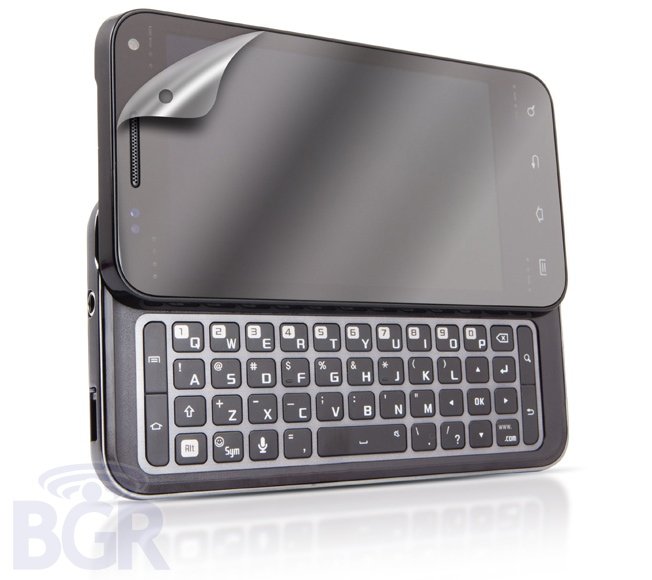
    The phone in the picture above is a leaked QWERTY slider from Samsung that runs on Android. It is set to release on the AT&T network.
    The device will feature 4 touch sensitive buttons rather than the 3 button layout. This was changed on AT&T’s request.The phone also has a slide out 4 row QWERTY keyboard.
    It is most likely to run Gingerbread 2.3 upon release itself. Not much other data is known regarding the device.
    The image rendering of the device doesn’t show any AT&T branding. But rumours are that it should hit AT&T within the next few months and it might be replace the Infuse 4G as the flagship model.
    source