WELCOME

HELLO! !!

Tuesday, December 13, 2011

Android Tips and Tricks


*#*#4636#*#*


This shows the following information about your phone and battery:


    Phone information
    Battery information
    Battery history
    Usage statistics
========================================================================
    *#*#7780#*#*


This performs a factory data reset, and will remove the following:


    Google account settings stored in your phone
    System and application data and settings
    Downloaded applications


It will NOT remove:
Current system software and bundled applications
    SD card files e.g. photos, music files, etc.


PS: This one asks for a confirmation, so if you do get a chance to change your mind.
========================================================================
    *2767*3855#


Don’t try this one unless you’re sure. This code is used for factory format, and will remove all files and settings including the internal memory storage. It will also reinstall the firmware.


PS: Once you give this code, there is no way to cancel the operation unless you remove the battery from the phone, and even then, you run the risk of bricking your phone.
========================================================================
    *#*#34971539#*#*


This code is used to get information about the camera. It shows following 4 menus:


    Update camera firmware in image (Don’t try this option)
    Update camera firmware in SD card
    Get camera firmware version
    Get firmware update count


WARNING: Never use the first option otherwise your phone camera may stop working, and there is really no reason to update the camera firmware anyway.
==================================================================================================
    *#*#7594#*#*


This code will change the “End Call / Power” button action on your phone. By default, if you long press the button, it shows a screen asking you to select any option from Silent mode, Airplane mode and Power off.


You can change this action using this code. You can enable direct power off on this button so you don’t need to waste your time in selecting the option.
==================================================================================================
    *#*#273283*255*663282*#*#*


This code opens a File copy screen where you can backup your media files e.g. Images, Sound, Video and Voice memo.
==================================================================================================
    *#*#197328640#*#*


This code can be used to enter into Service mode. You can run various tests and change settings in the service mode.
==================================================================================================
   {{{ WLAN, GPS and Bluetooth Test Codes:}}}


*#*#232339#*#* OR *#*#526#*#* OR *#*#528#*#* – WLAN test (Use “Menu” button to start various tests)


*#*#232338#*#* – Shows WiFi MAC address


*#*#1472365#*#* – GPS test


*#*#1575#*#* – Another GPS test


*#*#232331#*#* – Bluetooth test
*#*#232337#*# – Shows Bluetooth device address
==================================================================================================
    *#*#8255#*#*


This code can be used to launch GTalk Service Monitor.
========================================================================
    {{{Codes to get Firmware version information:}}}


*#*#4986*2650468#*#* – PDA, Phone, H/W, RFCallDate


*#*#1234#*#* – PDA and Phone


*#*#1111#*#* – FTA SW Version


*#*#2222#*#* – FTA HW Version


*#*#44336#*#* - PDA, Phone, CSC, Build Time, Changelist number
========================================================================
    {{{Codes to launch various Factory Tests:}}}
*#*#0283#*#* – Packet Loopback


*#*#0*#*#* – LCD test


*#*#0673#*#* OR *#*#0289#*#* – Melody test


*#*#0842#*#* – Device test (Vibration test and BackLight test)


*#*#2663#*#* – Touch screen version


*#*#2664#*#* – Touch screen test


*#*#0588#*#* – Proximity sensor test


*#*#3264#*#* – RAM version
========================================================================

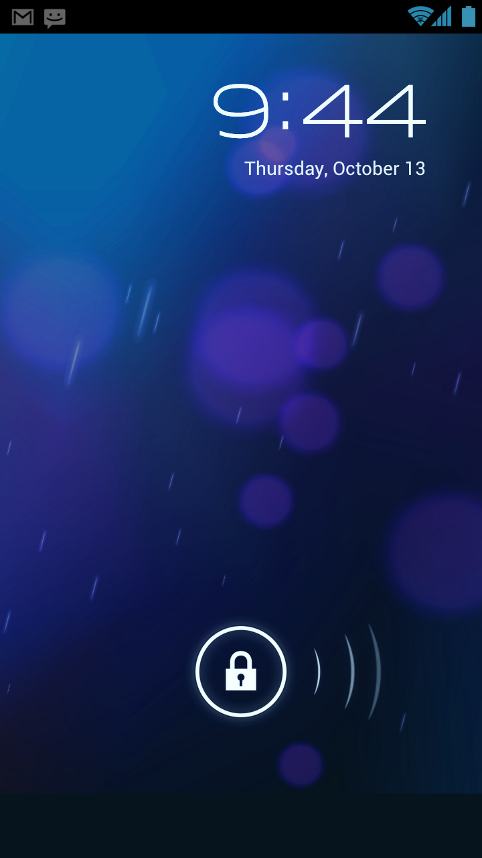
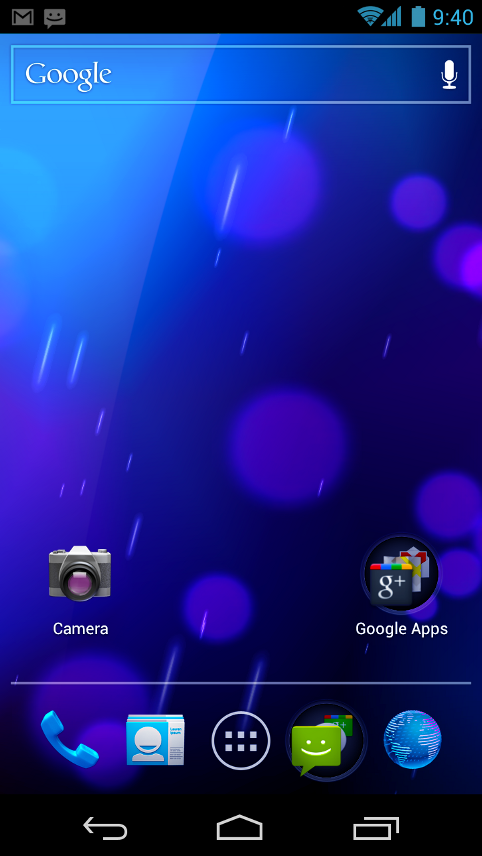
Android 4.0 (Ice Cream Sandwich)


Simple, beautiful, beyond smart

Android 4.0 builds on the things people love most about Android — easy multitasking, rich notifications, customizable home screens, resizable widgets, and deep interactivity — and adds powerful new ways of communicating and sharing.

Refined, evolved UI

Focused on bringing the power of Android to the surface, Android 4.0 makes common actions more visible and lets users navigate with simple, intuitive gestures. Refined animations and feedback throughout the system make interactions engaging and interesting. An entirely new typeface optimized for high-resolution screens improves readability and brings a polished, modern feel to the user interface.

Virtual buttons in the System Bar let users navigate instantly to Back, Home, and Recent Apps. The System Bar and virtual buttons are present across all apps, but can be dimmed by applications for full-screen viewing. Users can access each application's contextual options in the Action Bar, displayed at the top (and sometimes also at the bottom) of the screen.


Sunday, July 31, 2011

Apple is richer than the US Government


According to a recent report by the Financial Post, Apple has more cash than the U.S government. Applereported the quarterly earnings of US$ 75.876 billion till the 25th of June 2011 . The U.S governmentreported total operating balance of US$ 73.768 billion on Thursday , which is lesser than Apple.
Apple has seen tremendous growth since they introduced their first iPhone in the year of 2007. According to the recent report from IDC, Apple still holds the 4th place, based on the worldwide mobile phoneshipments in Q2 2011 and the shipments have increased 141.8% when compared to Q2 2010.
These figures are not directly comparable, since the U.S government’s balance amount is the amount of money they can spend before they hit the debts and the Apple’s earnings are the revenues from the sales. Based on the market capitalization, Apple is the second largest company in the world after Exxon Mobil.

iOS 5 Adding Face Recognition Support


9to5 Mac reports that Apple is adding support for face recognition in iOS 5.0 .  The feature will be accessible via API calls by developers allowing for some very interesting applications. The site reports that one of the APIs allows for recognizing the position of the person’s eyes and mouth.
Apple are also said to be working on some applications making use of the new features which will ship pre-installed on devices. Apple had previously acquired a company called Polar Rose in 2010 which specialized in Facial Recognition. Developers on Android have already demonstrated some interesting things which can be done by recognizing facial gestures and it will be very interesting to see how Apple takes this forward.

Nokia N9 Launching on 15th September on Swiss Orange ?


MeeGo Experts report that the long awaited Nokia N9 might be available via Swiss Orange starting September 15th. The website has put up a page for the MeeGo Harmattan device and listed 15th September as date of availability alongside the specifications.
The Nokia N9 comes with a large 3.9″ AMOLED curved glass display. The phone runs a custom build of MeeGo which uses a proprietary 3 panel Swipe-UI. The camera is an 8MP unit and captures 720p video at 30FPS.

Thursday, July 28, 2011

Samsung Releasing White Galaxy S II in August


It seems that Samsung is set to release the Galaxy S II in white. It will be the just like the international Samsung Galaxy S II GT-I9100 but in white colour.
The device is said to be coming out early next month (August). Handtec UK is already taking pre-orders for the white version. Were not sure if the entire device will be in white or whether the front or back alone will be in white.
Samsung are also said to be readying another version of the Galaxy S II with slightly better specifications including a faster processor. Perhaps this upgraded model might be released in white as well.
For people who already have the black version of the Galaxy S II and would like it in white, you can try the Glas protector from SGP. It gives you an option of White, Pink or Back front plate which doubles as a screen protector.

Mozilla B2G Announced : Web Centric Mobile OS


Mozilla today announced its plans to develop an open source mobile operating system. The OS will be focused primarily on web-apps. Dubbed B2G , the OS will make use of HTML5 capabilities to deliver basic phone functionality via various APIs.
Mozilla will be using parts from Android to enable hardware acceleration.
Mozilla’s plan with the OS is to provide :
  • New web APIs: build prototype APIs for exposing device and OS capabilities to content (Telephony, SMS, Camera, USB, Bluetooth, NFC, etc.)
  • Privilege model: making sure that these new capabilities are safely exposed to pages and applications
  • Booting: prototype a low-level substrate for an Android-compatible device
  • Applications: choose and port or build apps to prove out and prioritize the power of the system.
  • The User Interface is going to be entirely unique and will build an application stack around Gecko. The B2G project is still in the early stages so we shouldn’t expect any devices based on the OS to hit the market anytime soon.

    Nokia declares operating loss of 487 million euros in Q2


    nokia results
    Nokia today declared an operating loss of 487 million euros in Q2.The company managed to ship 88.5 million phones in the quarter and had net sales of 9.3 billion euros but the handset maker is struggling to make a profit.Looks like Nokia CEO Stephen Elop has some tough days ahead of him.

    Nokia continues to face a lot of competition from Android phones in the smartphone space and in the low end by re-branded Chinese handset vendors.
    Nokia is expected to ship the N9 in this quarter and unveil it’s Windows Phone 7 devices later this year. Nokia’s partnership with Microsoft is critical to the handset maker as the company faces huge declines in sales and profits.
    While we still figure out the details of the report you can read the complete results in the link below.
    Read [PDF]

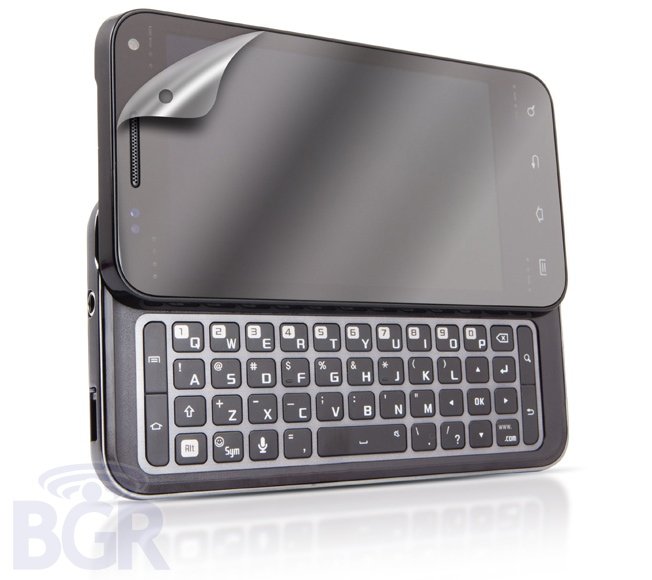
    Samsung Android QWERTY Slider Leaked


    The phone in the picture above is a leaked QWERTY slider from Samsung that runs on Android. It is set to release on the AT&T network.
    The device will feature 4 touch sensitive buttons rather than the 3 button layout. This was changed on AT&T’s request.The phone also has a slide out 4 row QWERTY keyboard.
    It is most likely to run Gingerbread 2.3 upon release itself. Not much other data is known regarding the device.
    The image rendering of the device doesn’t show any AT&T branding. But rumours are that it should hit AT&T within the next few months and it might be replace the Infuse 4G as the flagship model.
    source

    Friday, July 22, 2011

    What is Jailbreak, Why to Jailbreak & History Of Jailbreaking


    There is a huge excitement around as far as the jailbreaking is concerned. Every time Applecomes up with a new device, the first question we ask the developers of the jailbreakcommunity is: Can this device be jailbroken? And most of the time the answer has been yes, but on very few occasions, they have told us to wait, until they come up with a better solution. Jailbreak has become a very essential part of people who own iPhone, iPad, iPod Touch or Apple TV. So here we are going to talk about what the jailbreak is, why do we want to jailbreak, and the history of jailbreaking.
    Jailbreak iPhone 297x250 What is Jailbreak, Why to Jailbreak & History Of Jailbreaking

    What is Jailbreaking?

    So let’s start with what jailbreak is? Have you guys ever wondered that what technology revolves around the process of jailbreaking, don’t worry no one cares about that unless it works fine. Let me tell you a little story so that you can understand what the jailbreak is. Consider Apple as the owner of a prison. Once you buy Apple product you are in that prison. A person in there can only use the things that are currently present in the prison. You cannot access anything that is outside the prison unless your break out of it. Now comes the jailbreak team, they are trying to help you out of the prison so that you can access anything that Apple doesn’t control. Once you are out you can use anything or have anything you like on your Apple device.
    jailbreak Prison 328x250 What is Jailbreak, Why to Jailbreak & History Of Jailbreaking
    So the scenario is similar to that of jailbreaking Apple device. You can only install those appsthat are Apple approved. After you jailbreak, you are out of the prison and can install apps that are not approved by Apple. After this process you are blacklisted by Apple.
    Though the jailbreak is legal, but Apple, from time to time releases a patch that could createhindrance in this activity of jailbreakers. Just like road blocks, when a prisoner is escaped. But they are very smart in finding an alternate way, like a hidden shortcut while playing Need for Speed.

    Why to Jailbreak?

    cydia icon 150x150 What is Jailbreak, Why to Jailbreak & History Of JailbreakingIn more technical terms, jailbreaking is referred to as ‘hacking’; to have access to the locked files in order to unlock your device so that you can run it on any carrier. It installs an app store like Cydia, which contains a number of apps that you won’t see at the App Store. Thus allowing you to gain full access to your device and unlock new features. If you want to know what Cydia offers, you might want to check out our posts on topic Cydia from here.

    History

    The history of jailbreaking starts with the release of the first iPhone back in June, 2007. After few months the iPhone hackers gained root access to the file system of the iPhone OS. This allowed them to add their own code. Not even a month later the first third party app was released.  A year later, with the release of OS 2.0 for iPhone, iPhone Dev Team was originally formed. They released a tool known as Pwange Tool, which was the first ever GUI based tool to jailbreak iPhone at that time. Since then, the iPhone Dev Team has been at the forefronts of the jailbreaking technology.
    The release of OS 3.0 thwarted all the jailbreakers, because the tools at that time failed to jailbreak the newly released OS. But as said earlier, the jailbreakers are very smart; they released a newer version of Pwange Tool (3.0) and Redsn0w, the first ever tool to jailbreak OS 3.0.
    This rivalry between the iPhone Dev Team and Apple heated up when George Hotz(GeoH0t) enters in the battle and joined the jailbreakers side. With his release of Blackra1n, the OS 3.1.2 released by Apple was successfully jailbroken on iPod Touch 3G.
    blackra1n 357x250 What is Jailbreak, Why to Jailbreak & History Of Jailbreaking
    The release of OS 3.1.3, once again created an atmosphere of frustration for the jailbreakers, as it prevented the third-gen iPhone and iPod from downgrading, if they are already jailbroken. Comex released a video which shows a promo of the untethered jailbreak known as Spirit. After that the jailbreakers start working on the new technology of untethered jailbreak. (Geohot on Limera1n).
    So, now Apple releases the iPad. With this the Comex’s Spirit (which was same as Blackra1n – single button jailbreak) was released that worked on all the iPhones, iPods running on OS 3.1.3 and iPad running on OS 3.2.
    redsn0w icon 150x150 What is Jailbreak, Why to Jailbreak & History Of Jailbreaking
    With the release of iOS 4, the iPhone Dev Team released Redsn0w and updated the Pwnage Tool. At this time Sn0wbreeze – one of the most famous jailbreaking tools for Windows was also released. These tools were a success for the jailbreakers on all the devices other than the iPhone 4 initially.
    The jailbreakers were at large, and Geohot was out of the jailbreaking act, soon after that jailbreaking was declared legal in US. But no one care that if it’s legal or not, and since then people were more likely to jailbreak their devices. The strong iOS 4 on iPhone 4 was withstanding the jailbreaker’s hits to get hacked, until Comex releasedJailbreakMe 2.0. This was the first browser-based(works only on safari) jailbreaking tool. Apple released an updated version of iOS 4 which made this tool useless, as Apple closed the PDF exploit. So once again Apple won for a short period of time. This made the jailbreakers to think of alternative solutions as before. Many of us, got their iPhone dead.
    So a need of another way was in demand by the jailbreak fans, and therefore SHAtter, an exploit by Chronic Dev Team, from which a device once jailbroken will always be jailbroken was under in progress. But this lead to some complications and pod2g, who discovered SHAtter exploit, left the Chronic Dev Team. In the meantime, iH8sn0w came up with the newer version of Sn0wbreeze, which was capable of jailbreaking the iOS 4.1, but still the fourth-gen iPhone and iPod Touch withstand the force of the jailbreakers, thus they were impregnable from jailbreaking.
    Greenpois0n 150x150 What is Jailbreak, Why to Jailbreak & History Of Jailbreaking
    The Chronic team at that time was known to be working on the exploit they had found earlier. They released a new jailbreaking tool known as Greenpois0n, which was based on SHAtter; was able to jailbreak the fourth-gen iPhone and iPod Touch, along with the iPad.
    limera1n1 What is Jailbreak, Why to Jailbreak & History Of Jailbreaking
    Geohot returns with release of Limera1n for Windows. Shortly after this release Limera1n for Mac was also released to jailbreak iOS 4.1. The Chronic Dev Team which was supposed to be working on the Greenpois0n that time released it too after a short period of time (for Mac). This made all the jailbroken devices working on iOS 4.1.
    After that Apple released iOS 4.2.1 and later version (iOS 4.3.x). Since then Sn0wbreeze,Redsn0w and Pwnage Tool came in newer versions to tackle the newer iOS, and in all the cases jailbreakers seemed to have pretty much control over the jailbreaking and unlocking. Some of them are untethered and others tethered. Ultrasn0w was updated too to unlockbasebands.
    iOS5 Jailbreak What is Jailbreak, Why to Jailbreak & History Of Jailbreaking
    Now Apple is at the verge of releasing its new operating system known as iOS 5. We have seen in the past that all the beta versions of this OS have already been jailbroken. And for those people who are still using iOS 4.3.3 can use JailbreakMe 3.0 to jailbreak their devices. JailbreakMe 3.0 was released a week back and is known to be the easiest jailbreak of all time.
    The Dev Team up till now has always been in lead and on the other hand Apple at every turn uses tactics to avoid the jailbreak at any cost. If you are more of a jailbreak fan than of Apple, hope for the best and just wait to see coming more and more.
    That is all you need to know about the jailbreak, if you have anything interesting to share don’t forget to write about it in the comment section below.

    Wednesday, July 13, 2011

    Google Nexus Prime Info Leaked by Samsung


    Samsung Romania’s Twitter account seems to have tweeted information and specifications of the Google Nexus Prime which is said to be manufactured by Samsung.
    The device reportedly has a 720p HD (1280×720 pixels) screen (Super AMOLED HD) and will be the firstphone to run Google’s Android Ice Cream Sandwich OS Version 4.0.
    Prime is the codename but it might end up being launched officially as the Nexus Prime itself.
    There might be more than one Ice Cream Sandwich device launched at the same time with rumours indicating that Motorola and LG might launch their devices on networks such as AT&T, Sprint, Verizon, T-Mobile etc.