To NTFS or not to NTFS that is the question. But unlike the deeper questions of life, this one isn't really all that hard to answer. For most users running Windows XP, NTFS is the obvious choice. It's more powerful and offers security advantages not found in the other file systems. But let's go over the differences among the files systems so we're all clear about the choice. There are essentially three different file systems available in Windows XP: FAT16, short for File Allocation Table, FAT32, and NTFS, short for NT File System.
Thursday, December 2, 2010

Want To Download Torrent File By Using Google
Simple way...just type:
*ur file name* filetype:torrent
You must not write ( * ) when you search....
Example:
ANTIVIRUS KASPERSKY filetype:torrent
*ur file name* filetype:torrent
You must not write ( * ) when you search....
Example:
ANTIVIRUS KASPERSKY filetype:torrent
How to Rename the Recycle Bin
To change the name of the Recycle Bin desktop icon, open Regedit and go to:
HKEY_CLASSES_ROOT/CLSID/{645FF040-5081-101B-9F08-00AA002F954E}
and change the name “Recycle Bin” to whatever you want.
and Please Restart your Computer.
HKEY_CLASSES_ROOT/CLSID/{645FF040-5081-101B-9F08-00AA002F954E}
and change the name “Recycle Bin” to whatever you want.
and Please Restart your Computer.
save processor power.txt
It is a simple trick to save your processor power on your XP System.
Your processor polls your USB ports once every millisecond. It keeps doing this, even if you aren’t going to attach any USB devices. You can increase the polling interval—essentially by enabling “USB idling”—thus allowing some processors to enter power-saving mode.
Navigate to:
HLM\System\CurrentControlSet\Control\Class\{36FC9E 60-C465-11CF-8056-444553540000}\0000
Create a new DWORD value called IdleEnable and set it to 1 to enable USB idling, thus increasing the polling interval. Restart Windows for the change to take effect
Your processor polls your USB ports once every millisecond. It keeps doing this, even if you aren’t going to attach any USB devices. You can increase the polling interval—essentially by enabling “USB idling”—thus allowing some processors to enter power-saving mode.
Navigate to:
HLM\System\CurrentControlSet\Control\Class\{36FC9E 60-C465-11CF-8056-444553540000}\0000
Create a new DWORD value called IdleEnable and set it to 1 to enable USB idling, thus increasing the polling interval. Restart Windows for the change to take effect
A Code To Clean All Temporary Files,Cookies,Temperary Internet Files !!!!
Just use notepad....
Use this 'tutorial' to clean your: *.tmp、*._mp *.log 、*.gid、*.chk、*.old、*.bak and ?Temporary Internet Files? ,etc...
Step 1:
Start with making a new txt file.
Step 2:
Paste this code in the txt file:
Code: Select all
@echo off
echo Webhog Cleaner
echo waiting
del /f /s /q %systemdrive%\*.tmp
del /f /s /q %systemdrive%\*._mp
del /f /s /q %systemdrive%\*.log
del /f /s /q %systemdrive%\*.gid
del /f /s /q %systemdrive%\*.chk
del /f /s /q %systemdrive%\*.old
del /f /s /q %systemdrive%\recycled\*.*
del /f /s /q %windir%\*.bak
del /f /s /q %windir%\prefetch\*.*
rd /s /q %windir%\temp & md %windir%\temp
del /f /q %userprofile%\cookies\*.*
del /f /q %userprofile%\recent\*.*
del /f /s /q ?%userprofile%\Local Settings\Temporary Internet Files\*.*?
del /f /s /q ?%userprofile%\Local Settings\Temp\*.*?
del /f /s /q ?%userprofile%\recent\*.*?
echo complete!
echo. & pause
Step 3:
Now save the file as "Cleaner.bat"
After saving this file, Just open it and see for your self
Use this 'tutorial' to clean your: *.tmp、*._mp *.log 、*.gid、*.chk、*.old、*.bak and ?Temporary Internet Files? ,etc...
Step 1:
Start with making a new txt file.
Step 2:
Paste this code in the txt file:
Code: Select all
@echo off
echo Webhog Cleaner
echo waiting
del /f /s /q %systemdrive%\*.tmp
del /f /s /q %systemdrive%\*._mp
del /f /s /q %systemdrive%\*.log
del /f /s /q %systemdrive%\*.gid
del /f /s /q %systemdrive%\*.chk
del /f /s /q %systemdrive%\*.old
del /f /s /q %systemdrive%\recycled\*.*
del /f /s /q %windir%\*.bak
del /f /s /q %windir%\prefetch\*.*
rd /s /q %windir%\temp & md %windir%\temp
del /f /q %userprofile%\cookies\*.*
del /f /q %userprofile%\recent\*.*
del /f /s /q ?%userprofile%\Local Settings\Temporary Internet Files\*.*?
del /f /s /q ?%userprofile%\Local Settings\Temp\*.*?
del /f /s /q ?%userprofile%\recent\*.*?
echo complete!
echo. & pause
Step 3:
Now save the file as "Cleaner.bat"
After saving this file, Just open it and see for your self
Tuesday, November 30, 2010
Samsung Corby Unknown Secrets
I Start with the basic secret code which is common for all mobile phones
1) *#06# — This will show the IMEI(International Mobile Equipment Identity) number of the mobile phone.
2) *2767* 5282# — This will reset the Java Application (It Deletes All Java Midlets which are installed in your phone)
3) #*7728# — This will is a master reset code which will not delete any thing from your mobile but will set everything to factory default settings when it was on the time when we bought at the time of purchase.
1) *#06# — This will show the IMEI(International Mobile Equipment Identity) number of the mobile phone.
2) *2767* 5282# — This will reset the Java Application (It Deletes All Java Midlets which are installed in your phone)
3) #*7728# — This will is a master reset code which will not delete any thing from your mobile but will set everything to factory default settings when it was on the time when we bought at the time of purchase.
Simple Run Commands to make life easier
These are just some of the commands i have which work on OS starting Win2k & above, sorry dont have any idea if they work on the OS before Win2k
Accessibility Controls - access.cpl
Add Hardware Wizard - hdwwiz.cpl
Add/Remove Programs - appwiz.cpl
Administrative Tools - control admintools
Automatic Updates - wuaucpl.cpl
Bluetooth Transfer Wizard - fsquirt
Calculator - calc
Certificate Manager - certmgr.msc
Character Map - charmap
Check Disk Utility - chkdsk
Clipboard Viewer - clipbrd
Command Prompt - cmd
Component Services - dcomcnfg
Computer Management - compmgmt.msc
Date and Time Properties - timedate.cpl
DDE Shares - ddeshare
Device Manager - devmgmt.msc
Direct X Control Panel (If Installed)* - directx.cpl
Direct X Troubleshooter - dxdiag
Disk Cleanup Utility - cleanmgr
Accessibility Controls - access.cpl
Add Hardware Wizard - hdwwiz.cpl
Add/Remove Programs - appwiz.cpl
Administrative Tools - control admintools
Automatic Updates - wuaucpl.cpl
Bluetooth Transfer Wizard - fsquirt
Calculator - calc
Certificate Manager - certmgr.msc
Character Map - charmap
Check Disk Utility - chkdsk
Clipboard Viewer - clipbrd
Command Prompt - cmd
Component Services - dcomcnfg
Computer Management - compmgmt.msc
Date and Time Properties - timedate.cpl
DDE Shares - ddeshare
Device Manager - devmgmt.msc
Direct X Control Panel (If Installed)* - directx.cpl
Direct X Troubleshooter - dxdiag
Disk Cleanup Utility - cleanmgr
Saturday, November 27, 2010
Bandwidth Vs Download Speed Are they same?
The answer is NO... because Bandwidth is the maximum traffic capacity of your Network and Download Speed is what you actually get. Let me explain...
Download Speed depends on two factors. One is Bandwidth. Another is Latency (Also called Delay). Bandwidth is the amount of data that can be transferred during a second. It is normally expressed in bits per second.
Latency is the Round-Trip Time (Host Server -> Destination Server -> Host Server) taken for a small packet of data (usually 32 bytes) when you ping with CMD (Command Prompt). Pinging is a method to measure latency. Latency is normally expressed in milliseconds. Latency increases either if the distance between the Host Server (Your Computer) and the Destination Server (Any Website) increases or if there is a congestion in the traffic. But Latency will not necessarily decrease even if Bandwidth is increased. Why?
In simple terms, Bandwidth is like the width of a pipe. Latency indicates the time taken to cross a particular distance by the flow inside the pipe!! Both these factors together determine the end-result (Download Speed). Got it?
The next-time you communicate with your ISP (Internet Service Provider), don't forget to ask your actual Download speed!!
Google Rolls Out Google Swirl Image Search Engine
this is the latest news about google
Google has rolled out yet another cool google lab feature on 15th november. Google has always been the first to roll out some unique features. Google swirl image search engine not only finds out similar images but it divides them into the group and sub-groups.
Basically Google swirl groups the images according to searched keywords. When you click on the image it will form a cluster of all images. The clustering is done based on the similarity of the images.
Swirl search engine is basically based on the technique called “Similar images” and “Picasa face recolonization” to which decides how to group the images in groups and hierarchies of the group.
You can check the search engine in work from here http://image-swirl.googlelabs.com/
Try Google swirl image search engine and enjoy having the fun with image search . Did you like the new Google lab feature?
Google has rolled out yet another cool google lab feature on 15th november. Google has always been the first to roll out some unique features. Google swirl image search engine not only finds out similar images but it divides them into the group and sub-groups.
Basically Google swirl groups the images according to searched keywords. When you click on the image it will form a cluster of all images. The clustering is done based on the similarity of the images.
Swirl search engine is basically based on the technique called “Similar images” and “Picasa face recolonization” to which decides how to group the images in groups and hierarchies of the group.
You can check the search engine in work from here http://image-swirl.googlelabs.com/
Try Google swirl image search engine and enjoy having the fun with image search . Did you like the new Google lab feature?
100 ways to make your computer blazingly fast
1. Defragment your computer hard disk using free tools like SmartDefrag.
2. You should also defragment your Windows pagefile and registry.
3. Clean up hard drive disk space being taken up by temporary files, the recycle bin, hibernation and more. You can also use a tool like TreeSize to determine what is taking up space on your hard drive.
4. Load up Windows faster by using Startup Delayer, a free program that will speed up the boot time of Windows by delaying the startup of programs.
5. Speaking of startup programs, many of them are useless and can be turned off. Use the MSCONFIG utility to disable startup programs.
6. By default, the size of the paging file is controlled by Windows, which can cause defragmentation. Also, the paging file should be on a different hard drive or partition than the boot partition. Read here on the rules for best paging file performance.
7. In Windows XP and Vista, the Windows Search indexing service is turned on for all local hard drives. Turning off indexing is a simple way to increase performance.
8. If you don’t care about all the fancy visual effects in Windows, you can turn them off by going to Performance Options.
9. You can optimize the Windows boot time using a free program called Bootvis from Microsoft.
10. Clean your registry by removing broken shortcuts, missing shared DLLs, invalid paths, invalid installer references and more. Read about the 10 best and free registry cleaners.
11. One of the main reasons why PC’s are slow is because of spyware. There are many programs to remove spyware including Ad-Aware, Giant Antispyware, SUPERAntiSpyware, and more.
12. If you have a deeper spyware infection that is very hard to remove, you can use HijackThis to remove spyware.
13. Remove unwanted pre-installed software (aka junk software) from your new PC using PC Decrapifier.
2. You should also defragment your Windows pagefile and registry.
3. Clean up hard drive disk space being taken up by temporary files, the recycle bin, hibernation and more. You can also use a tool like TreeSize to determine what is taking up space on your hard drive.
4. Load up Windows faster by using Startup Delayer, a free program that will speed up the boot time of Windows by delaying the startup of programs.
5. Speaking of startup programs, many of them are useless and can be turned off. Use the MSCONFIG utility to disable startup programs.
6. By default, the size of the paging file is controlled by Windows, which can cause defragmentation. Also, the paging file should be on a different hard drive or partition than the boot partition. Read here on the rules for best paging file performance.
7. In Windows XP and Vista, the Windows Search indexing service is turned on for all local hard drives. Turning off indexing is a simple way to increase performance.
8. If you don’t care about all the fancy visual effects in Windows, you can turn them off by going to Performance Options.
9. You can optimize the Windows boot time using a free program called Bootvis from Microsoft.
10. Clean your registry by removing broken shortcuts, missing shared DLLs, invalid paths, invalid installer references and more. Read about the 10 best and free registry cleaners.
11. One of the main reasons why PC’s are slow is because of spyware. There are many programs to remove spyware including Ad-Aware, Giant Antispyware, SUPERAntiSpyware, and more.
12. If you have a deeper spyware infection that is very hard to remove, you can use HijackThis to remove spyware.
13. Remove unwanted pre-installed software (aka junk software) from your new PC using PC Decrapifier.
Use Notepad in Windows as Diary
This is good for people who use notepad to write down any info on a day
to day basis?
1. Open a blank Notepad file
2. Write .LOG (in CAPS only) as the first line of the file, followed by an Enter. Save the File and close it.
3. Double-click the file to open it and notice that Notepad appends the Current Date and Time to the end of the file and places the cursor on the Line after.
4. Type your notes and then save and close the file.
5. Each time you open the file, Notepad repeats the process, appending the Date and Time to the end of the file and placing the cursor below it.
to day basis?
1. Open a blank Notepad file
2. Write .LOG (in CAPS only) as the first line of the file, followed by an Enter. Save the File and close it.
3. Double-click the file to open it and notice that Notepad appends the Current Date and Time to the end of the file and places the cursor on the Line after.
4. Type your notes and then save and close the file.
5. Each time you open the file, Notepad repeats the process, appending the Date and Time to the end of the file and placing the cursor below it.
What is an IP Address?
IP address (Internet Protocol address) is a unique number that distinguishes one device from another on the Internet. In layman's terms, it is the same as your house number. An IP address serves two principal functions; identification and location addressing. This enables one to communicate with other computers all over the world.
There are two versions of Internet Protocol.
IP version 4: Currently used by most of the network providers. However, with more and more computers accessing the internet, IPv4 addresses are running out quickly because they are limited to approximately four billion only (256 to the fourth power).
IP version 6: The replacement for IPv4 has a vast range of IP addresses, inexhaustible for all practical purposes. The estimated number of unique addresses in IPv6 is trillions of trillions!!
In IPv4, an IP address is made up of four numbers, each between 0 and 255. The general information is conveyed by the first number, and the specific identification of a computer within a network is usually made by the last number. The IP address 0.0.0.0 is usually reserved for the default network and the address 255.255.255.255 is used for broadcasts.
IP addresses can be permanent or temporary.
Dynamic IP Address: When a home PC dials the Internet service provider (ISP) through modem/ router, an IP address is temporarily assigned from a pool of available addresses for the duration of the call. This IP address is not static and could change the next time.
Static IP Address: An IP address that is fixed and never changes. A single or a block of static IPs can be obtained for a few extra bucks a month from most ISPs (usually meant for Email/ Website servers).
Friday, November 26, 2010
Samsung Bracelet Smartphone Packs OLED Display, Relies on Memory Alloy Articulation
Erik Campbell designed a very original Samsung bracelet phone, a wearable mobile device concept that relies on memory alloy articulation. This smartphone is destined to reach the wrists of athletes, adventurers and tech freaks from all over the world. Here’s the design:
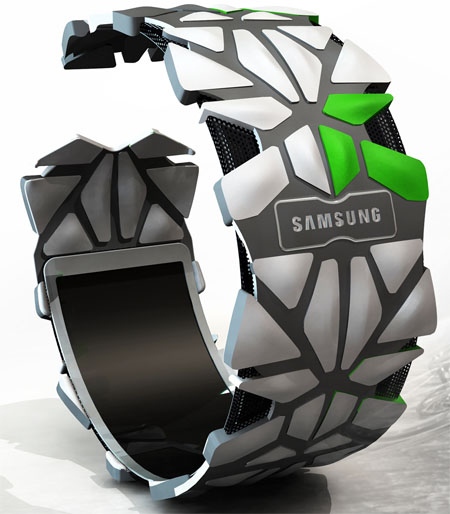
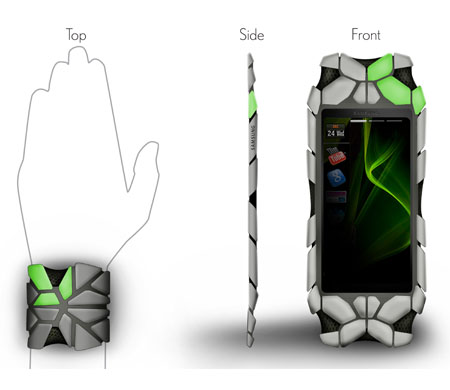
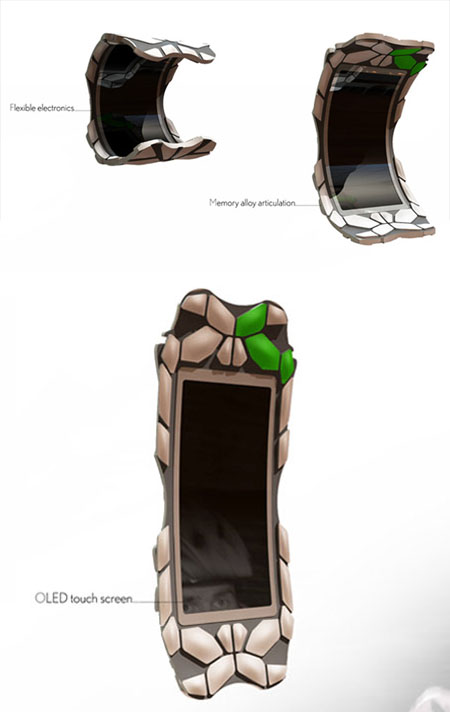
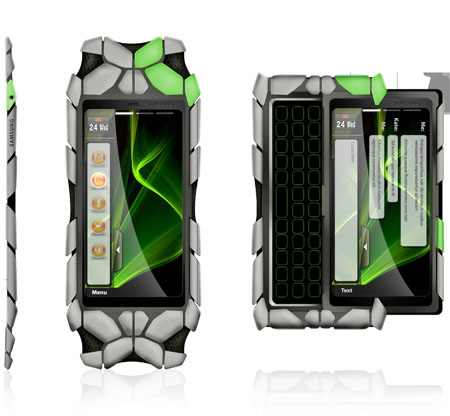
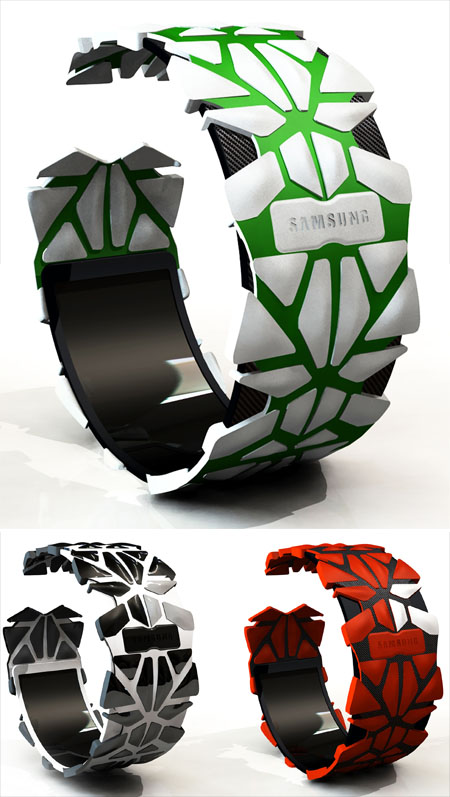

This device uses an OLED touchscreen display, a tactile keypad and a “split pad design”, in order to improve the air circulation and get rid of the hands’ sweat. Extreme sports gear and flexible electronics plus touchscreen… what more can you want?
You can even view YouTube and use G Talk on this Samsung concept phone while riding your mountain bike…
LG 3D Mobile Phone, Designed by Petr Kubik
Samsung already announced a 3D display mobile phone and we’ve all seen 3D television sets getting released lately. But what about other companies? Petr Kubik designed a 3D LG mobile phone concept, that includes glasses, an intuitive stylus and expandable screens. 3D movies and even tridimensional videocalling is supported on the device.


The 3D phone measures 66×133x14mm, features an adjustable leg support and a photovoltaic screen at the rear for instant recharging. It also comes with an expandable touch display, measuring 177×104mm. WiFi and Bluetooth are also on board, as well as Skype support, a mini USB port, speakers, a mic and 3D scanners.
The interactive stylus is a pretty nifty piece of work, but we’d like a cellphone that shows 3D images, without requiring special glasses. Can this be achieved and what company will do that first?
SAIC-GM YeZ, Eco-Friendly Concept Car of the Year 2030
The YeZ concept car is an all electric, eco-friendly vehicle that was designed by the joint venture of SAIC and GM. The design of the car is environment-oriented and gets its power from natural resources.

The concept vehicle features solar panels, which are located on the rooftop and small wind turbines, placed on its wheels. Besides the solar panels, the roof of the YeZ will benefit from an innovative system that will capture carbon dioxide from the surrounding air and then release oxygen in the atmosphere.
The electric energy generated by the solar panels and the wind turbines it’s going to be stored in onboard batteries that will power the vehicle. No technical specifications are available, since the YeZ concept is only a dream of eco-friendly cars that will be used in 2030.


BlackBerry Empathy Phone Comes With a Mood Ring, Flexible OLED Display
Daniel Yoon created one sweet, sweet BlackBerry concept, the Empathy Phone that comes with a mood ring, as shown below. This social networking-focused device delivers biometric data regarding the user’s emotional state, relying on the mood ring accessory.
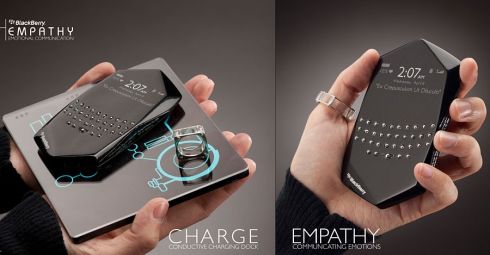

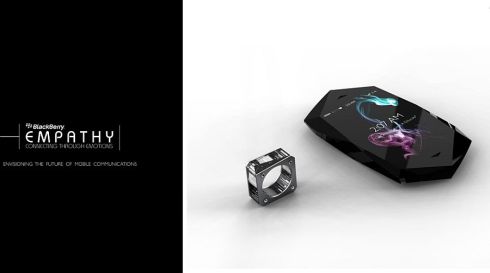
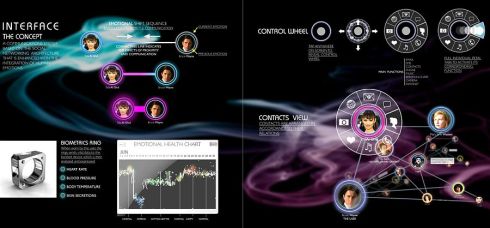
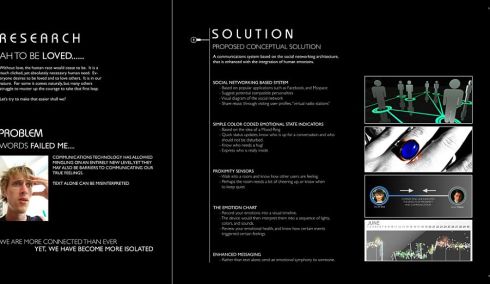
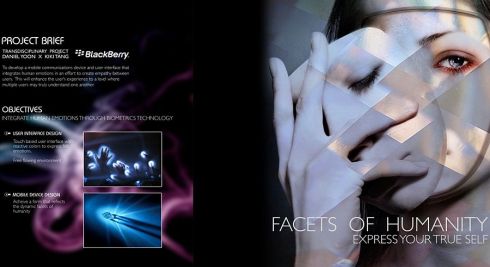
Imagine sharing your feelings not directly, but via the ring we mentioned. How cool is that? BlackBerry Empathy connects the user straight away to sites like FaceBook and MySpace for quick messaging and status updates. The device also comes with proximity sensors, allowing you to detect the emotions of the folks nearby through an emotion chart with a visual timeline.
Empathy uses movable keys, a translucent tactile keyboard and a flexible OLED display, plus a HUD (heads up display). The keypad on this phone can change color according to the user’s emotions, that are sensed through messages, phones calls and biometric sensors. Does this new take on social networking scare you, or do you find the concept appealing?
Thursday, November 25, 2010
How to Activate and Use “Find my iPhone” Feature on iPhone 3GS
Today me posting a very interesting guide on how to install and activate the “Find my iPhone” on any device with IOS. One of the most unexpected developments iOS 4.2 has been the launch of a version of the application Find my iPhone (Find my iPhone) with 30 new languages and the ability to run free using our Apple ID after configuring it as if you activate were a MobileMe account. The idea is great but comes with one of those strange decisions that both mosques, and rightly, affected users: one is free for iPhone users 4, IPAD or fourth-generation iPod.
But what if I told you that you can use in the rest of our devices with IOS 4.2? The process is very simple but is not available to everyone. All you need do is create a free account, MobileMe / Find my Iphone from one of the supported devices and then add it as such to those who initially are not. To do this you must add a new MobileMe account from Settings / Mail, contacts, calendar. introducing our Apple ID and password and accept the new terms of use. Then install the application on the device you want and repeat the above process. As easy as that.
Since this time, if ever lost or stolen iPhone, iPad, or iPod (the latter are more difficult to spot because they have to be connected to a WiFi network to work) you can keep track through the application ( obviously installed on another device with iOS you have not lost) or through the MobileMe website, send a message plan (hey, if you found my iphone call me at this number and I will reward you), play a sound to locate, lock remote or deleting it so that nobody can access your data.
Sony Ericsson Xperia X12 Anzu with Android Gingerbread OS
Some time ago many talked about the appearance of the Sony Ericsson Xperia X12 Android 2.3 of which had leaked some images and now the news is filtering its technical specifications, which are not bad.
- Snapdragon Qualcomm MSM7230 processor
- 8.1 megapixel camera with auto focus and lens easy recognition Exmor R
- HD video recording at 30fps 720p HD, with stereo audio support,
- 3.5mm output (with adapter)
- Noise cancellation
- FWVGA capacitive screen 4.2 “multi-touch LED x 16 million colors
- WiFi 802.11 b / g / n
- HDMI (type D)
- 125.0 x 62.5 x 8.7-10.9 mm
- Battery 1500 mAh
- Android Gingerbread OS
Some of the specs are really good, and it is estimated also that its price would be about 650 euros, which could leave him somewhat apart from the competition by now.
Nokia N9-01 MeeGo Phone concept 12MP, CBD 4.1″ 1280x720x32, 64gb, Dual Core 1GHz
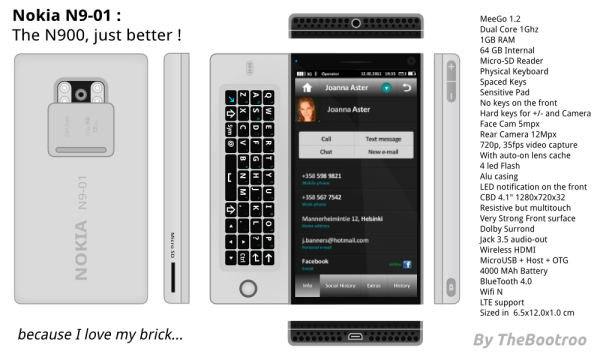
Thomas Boutroue sends in his Dream Nokia – the Nokia N9-01
His dream specs are on the side but just to reiterate:
- MeeGo 1.2
- Dual Core 1GHz
- 1GB RAM
- 64GB Internal
- Micro-SD Reader
- Physical Keyboard
- Spaced Keys
- Sensitive Pad
- No keys on the front
- Hard keys for +/0 and camera
- Face Cam 5MP
- Rear Cam 12MP
- Camera Lens Cover (Very, very important feature now realising what I’ve missed. So easy to wash out photos, especially with bright flash when there’s a smudge on the camera glass)
- 4 LED Flash (ooh quadflash again? No one seems to be a fan of the Xenon. Then again, I do miss that spontaneous LED torch. But Not so much as blurry people pics :p)
- Aluminium casing (Early N9 leak has that single aluminium macbook pro look)
- CBD 4.1″ 1280X720X32 (Where’s the 32? I’ve always envisioned that the surrounding side border around the phone could form some touch input – no actual buttons needed. Or that around the screen are a few SEPARATE pixels that would truly make it borderless but still be functional in certain situations where you might need that border.)
- LED Notification on the front (OH Real N9, you must have this like the N900. It’s unbelievably useful)
- Resistive but multitouch (uh oh – controversial. Die Hard N900 fans would agree. Well this is Thomas’ own Dream Nokia)
- Very Strong Front Surface
- Dolby Surround. Jack 3.5 Audio Out
- Wireless HDMI
- Micro USB + HOST + OTG
- 4000 mAh battery (AMEN! But I doubt we’ll ever get more than 1500mAh for any Nokia Phone given current size constraints from Nok)
- Bluetooth 4.0
- WiFi N
- LTE Support
- 6.5×12.0×1.0cm
The good thing is, a lot of these specs (bar a few such as battery capacity) are actually physically possible right now.
Very early Nokia MeeGo UI worth posting. Even if it doesn’t improve from this I’d be impressed.
Nokia N10 MeeGo Phone Concept

This comes by way of Peter Lackman – the Nokia N10. When I say N10 I can’t help but think Ben 10 (ah I’m so childish).
No details on specifications from the email but as you can see we have this:
- gloriously huge space eating screen – hardly any wasting of any phone face. This might well be the future where pretty much all front area is screen – the borderless goal huh?
- N10 sports the Nokia N8′s 12MP camera – no xenon but quad-LED-flash as seen in the X7 concept. Certainly be a pro-night video shooter.
- There’s HDMI,
- 4-row Tilt hinge QWERTY
- Near Field Communication (as secretly found in the C7)
- I love the phone book landscape. Blergh it is MeeGo. Cheers Andre

Subscribe to:
Posts (Atom)